





In this article
- How to calculate manufacturing throughput
- Make the number comparable before trying to raise it
- Throughput rate is not throughput time
- Why starting more work may not produce more finished orders
- Use SkyPlanner to make the sequence serve finished output
- Put ready work into a realistic sequence
- Save changeovers without losing sight of due dates
- Recalculate when the conditions change
- What material readiness changed at Eskomatic
- Check that more output is the output you need
Home » Resources » Manufacturing Throughput: Turn Busy Hours into Output
Estimated reading time: 8 minutes
The first machines are busy, pallets are filling up, and assembly is still waiting for the parts it needs. By the end of the shift, the factory has started plenty of work but completed too few orders.
Manufacturing throughput brings that gap into focus. It is the rate at which a defined production process completes good output: for example, accepted assemblies per hour or finished tonnes per shift. It measures what comes out, not how much activity takes place inside.
To improve it, you need more than a faster first operation. You need the right work to reach the next step while there is still time to finish it. SkyPlanner helps turn that requirement into a production schedule, connecting resource capacity, operation dependencies and priorities so that your team can work toward completed orders rather than longer queues.
How to calculate manufacturing throughput
Use this formula:
Manufacturing throughput rate = Good units completed ÷ Measurement period
Imagine that 80 units reach final inspection during an eight-hour shift. Eight still need correction and have not been accepted. The shift has therefore produced 72 good units:
72 good units ÷ 8 hours = 9 good units per hour
The units awaiting rework do not count as good output yet. If they are corrected and accepted later, count them once at that point, not again for every pass through a machine. Scrap does not count as good output.
For a continuous process, use an appropriate physical unit, such as kilograms or litres, instead of pieces. The principle is the same: define acceptable output and divide it by the time over which it was completed.
Make the number comparable before trying to raise it
A throughput figure needs a boundary. A machining cell can measure accepted parts leaving the cell; a factory can measure finished products passing final acceptance. Both are useful, but a higher cell rate does not prove that the factory finished more products.
Keep three choices consistent:
- The exit point. Count completions at the same stage. Moving the measurement from final acceptance to an earlier operation can make output look better without improving finished production.
- The time window. In the example, all eight shift hours remain in the denominator, including interruptions. A rate calculated only for machine-running hours answers a different question. Label it separately rather than removing lost time from the shift comparison.
- The product mix. A shift making simple brackets is not directly comparable with one making complex assemblies. Compare similar product families, or use a documented equivalent-output measure when the mix varies substantially.
For a make-to-order shop, keep the rate alongside delivery performance. Completing many easy units is not a success if the orders customers need are still waiting.
Throughput rate is not throughput time
The names are close, but the units tell you which question you are answering:
- Throughput rate: how much good output is completed per hour, shift or day?
- Throughput time: how long does a unit or batch spend travelling through the defined production process, including waiting?
- Manufacturing cycle time: how long does a repeatable operation or production cycle take? Some organizations use cycle time for the whole production interval, so state the boundary.
- Capacity: how much work could the available resources handle under the stated operating assumptions?
- Utilization: how much of a resource’s available time is occupied?
A machine can have high utilization while making components that will wait days for assembly. Equally, shortening a single operation may not increase finished output if another stage cannot accept the additional work.
Here, throughput means physical good-output rate. Throughput accounting uses a financial measure; do not mix monetary throughput with units per hour on the same performance chart.
Why starting more work may not produce more finished orders
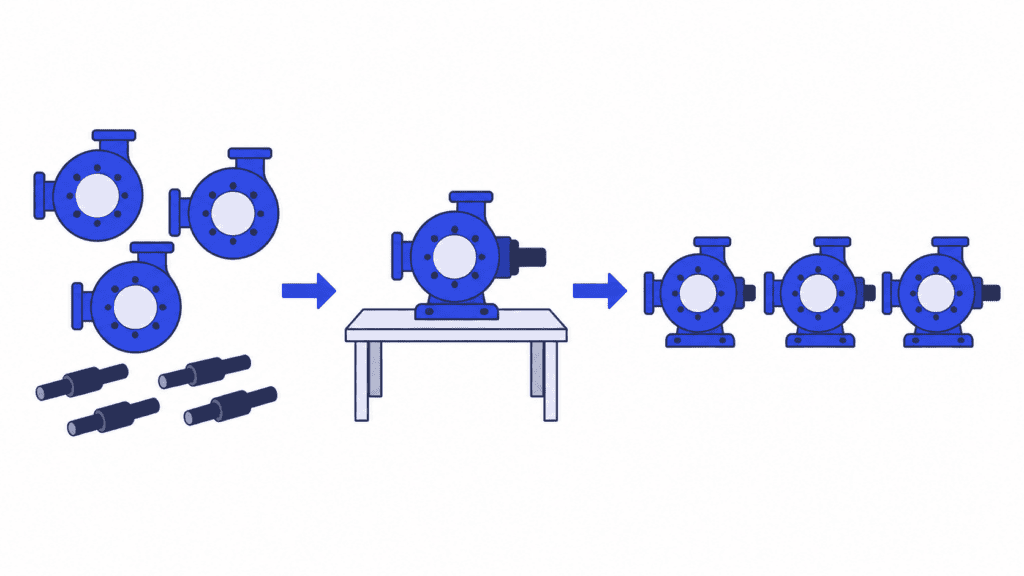
Imagine a factory assembling pump units. Each finished unit needs a machined housing and a shaft, and a shared machining centre can produce either component. To avoid a changeover, the operator continues with another housing batch. Meanwhile, assembly has housings available but is waiting for shafts.
Keeping the machining centre busy with housings adds work in process. It does not supply the missing component or complete a pump.
A finish-oriented plan works backwards from what assembly needs. It coordinates the housing and shaft operations so that matching components become available before the planned assembly slot. The machines have not become faster. The sequence has become more useful.
That does not mean stripping every queue to zero. Too little ready work can leave a critical resource idle when a preceding operation is delayed. The aim is enough of the right work at the right point, not the smallest possible queue everywhere.
Production bottlenecks still matter: a genuinely constrained operation sets a limit that sequencing alone cannot remove. But before buying more equipment, separate a shortage of processing capacity from avoidable waiting for materials, matching components or a workable job order.
Use SkyPlanner to make the sequence serve finished output
In a changing order book, coordinating those decisions manually soon becomes difficult. Moving a job affects the capacity available for other jobs, their following operations and their completion dates.
SkyPlanner APS handles that scheduling calculation. Its AI engine, Arcturus, schedules operations against configured workstation capacity, dependencies and priorities. The Gantt timeline shows the resulting plan. You set the priorities, rules and locks; Arcturus calculates within them.
For throughput improvement, three scheduling decisions are particularly valuable.
Put ready work into a realistic sequence
A promising machine slot is of little use if the required material will arrive tomorrow. With material-aware scheduling enabled, SkyPlanner considers material availability in its scheduling calculation. Operation dependencies also connect earlier work with the stages that follow it.
This gives you a plan built around when work can proceed, rather than a queue that assumes everything is ready. On the shop floor, use that plan to guide work release and check readiness before sending more jobs into production.
Save changeovers without losing sight of due dates
Switching repeatedly between tools, materials or colours can consume time that would otherwise be available for production. SkyPlanner can group jobs with matching properties through its workstation rules and dynamic priorities, using the configured setup time for differing jobs.
The benefit is a more deliberate sequence: compatible work can run together instead of every changeover being decided in isolation. Balance that grouping with completion-date and customer priorities. A long, convenient batch is not the right choice when it delays the components needed for an urgent finished order.
Recalculate when the conditions change
A delayed job or changed priority can make yesterday’s sequence unsuitable for today’s work. Arcturus can recalculate the schedule around the updated information, while the Gantt view lets you review the resulting assignments and completion dates.
Instead of rebuilding every machine queue by hand, you can focus on the decision: which work must finish first, whether capacity needs attention, and what commitments the revised plan supports.
What material readiness changed at Eskomatic
Eskomatic, a Finnish contract machining company, previously organized work queues largely by hand in an ageing production-control system. Limited visibility into material status meant shortages could surface too close to a job’s planned start.
With SkyPlanner connected to its existing ERP, the team gained clearer Gantt work queues, automated load scheduling and better visibility into material shortages. Eskomatic reports fewer production stoppages caused by missing materials and more accurate delivery-date setting.
Eskomatic’s experience shows why readiness matters to flow: a useful schedule addresses whether work can proceed, not just where it sits in the queue. For a planner, clearer daily work and fewer material-related interruptions mean less time untangling shortages after a job should already have started.
Check that more output is the output you need
After changing the sequence or release approach, measure accepted completions again using the same boundaries. Review comparable shifts or weeks, not just the first busy afternoon.
Look at the throughput rate together with work in process, quality and delivery performance. If more jobs are entering production but accepted completions are unchanged, the improvement may only be a larger queue. If output rises because you selected easier products, the mix explains at least part of the change. If finished inventory grows without demand, a higher rate can tie up cash rather than help the business.
Scheduling is also only part of the answer. Persistent breakdowns, defects or insufficient physical capacity need maintenance, quality or capacity action. A better plan helps coordinate available resources; it does not replace those resources or make an unstable process reliable by itself.
For a factory whose work is repeatedly waiting in the wrong place, SkyPlanner is a practical next step. It integrates with any ERP or MES through its open REST API, bringing existing production data into finite scheduling without requiring you to replace a system that already serves your business.
Book a SkyPlanner demo to discuss the jobs your factory struggles to finish. Bring a typical route, a recent material delay and the completion measure you want to improve. The useful question is not simply whether every machine could be busier. It is how a better sequence could help more of the right work leave production, accepted and ready for the customer.
Jussi Mäntylä
Production Planning Specialist, SkyPlanner


