





In this article
- What belongs in a manufacturing control plan?
- A control plan is not a work instruction or an inspection record
- Build the plan from the process and its risks
- Follow the actual manufacturing route
- Connect each control to a requirement and a reason
- Choose a method and frequency that can do the job
- Make the reaction plan specific enough to use
- Example: a bore check after machining
- Keep the control plan current from launch to routine production
- Schedule control-plan work with SkyPlanner
- Put the relevant instruction beside the job
- Use your own AI assistant to work with the plan
- What a shared production plan changes in practice
- Bring one route and its controls into a workable schedule
Home » Resources » Manufacturing Control Plan: From Risk to Daily Work
Estimated reading time: 12 minutes
A manufacturing control plan defines how a production process will be monitored and controlled so that its output meets requirements. It connects each relevant product characteristic or process parameter with a control method, measurement approach, sample size and frequency, responsible role and reaction when something goes wrong.
The document should answer a practical question at every important point in the route: what keeps this process under control, and what do we do if it is not?
That answer has to work on the factory floor. A check that requires a shared measuring machine needs time on that machine. An operator needs the applicable instruction, not an old copy found in a folder. SkyPlanner APS helps you put the planned inspection and testing work into the same schedule as manufacturing, with relevant instructions alongside the job. Your quality plan becomes easier to carry out without planners manually reconciling a separate inspection list with machine queues.
What belongs in a manufacturing control plan?
Start with the product or product family, applicable revision, process scope, plan owner and approval information required by your organisation and customer. Then make the planned controls understandable at the operation where they apply.
A useful control-plan entry connects these details:
- Process step: the operation number, description and relevant machine, fixture or equipment.
- Characteristic and requirement: the product feature or process parameter being controlled, its specification or tolerance, and any applicable special-characteristic designation.
- Control and measurement method: how the process is kept under control, what is checked and which measurement technique or referenced instruction is used.
- Sample size and frequency: how many items are checked and when, including applicable setup, restart or changeover checks.
- Responsibility and evidence: who performs the control, where the result is recorded and who reviews or acts on it.
- Reaction plan: what happens after a failed check or loss of control, who takes responsibility and what permits production to resume.
Use the format required for your work rather than treating this list as a universal mandatory form. The important test is whether the entry leads to a repeatable action. “Check dimensions regularly” leaves too much for each shift to interpret. A reference to a defined dimension, approved measuring method, specified interval and clear reaction gives the team something it can actually follow.
A control plan is not a work instruction or an inspection record
The control plan describes the controls across the process. A work instruction explains how to perform a particular task, such as locating a component in a fixture and measuring its bore. An inspection record retains the actual result. These documents support one another, but they answer different questions.
Likewise, a process failure mode and effects analysis, or PFMEA, examines what could go wrong and the associated risk. The control plan turns the selected controls into the arrangements used in production. A PPAP submission may include the control plan as part of the customer’s approval evidence; the plan still needs to remain useful after that submission is complete.
Keeping these roles clear avoids a common problem: a control-plan row that says “see work instruction” without identifying the characteristic, frequency or reaction that makes the control meaningful.
Build the plan from the process and its risks
Bring quality, process engineering and production together, including the people who perform the checks. Add planning or the relevant inspection-resource owner when the controls require shared equipment or separate testing work. A technically sound method is not ready for daily use if the equipment, time or responsibility is missing.
Follow the actual manufacturing route
Walk the process from incoming material through manufacturing, outside processing where relevant, final checks and dispatch. Match operation references across the process flow, risk analysis, control plan and work instructions so that a reader can follow the same step between them.
Check the route on the floor, not only in the engineering file. A temporary sorting operation or an extra test introduced after a complaint can become part of normal work without being reflected in the plan. Conversely, an obsolete check can remain in the document long after the process changes.
Decide the product-family scope carefully. Products can share a plan where their process and controls genuinely apply, but a family name should not hide different tolerances, equipment or customer requirements.
Connect each control to a requirement and a reason
Use drawings, specifications, customer requirements, process knowledge and risk analysis to identify what needs control. Include product characteristics, such as a finished diameter, and relevant process parameters, such as the setting that influences it.
Ask why each control exists. Is it preventing an error, detecting a problem before the next operation, or monitoring a process for signs of change? That distinction helps the team avoid treating final inspection as the answer to every risk. Finding a defect after all the value has been added does not prevent the defect from being made.
Do not copy special-characteristic symbols or classifications from another customer’s plan without checking their meaning. The designation and the response it requires need to match the applicable requirements.
Choose a method and frequency that can do the job
A measuring instrument has to be suitable for the characteristic and tolerance, and the measurement process has to give trustworthy results under actual working conditions. Specify the applicable method and ensure the operator can access the instruction and equipment needed to use it.
Sample size and frequency should follow the risk, process evidence and customer requirements. “One every hour” is not automatically right because it appears in a familiar template. Consider what can change between checks, how much output could be affected and whether setup or tool changes need a separate check.
Also distinguish specification limits from statistical control limits. Specification limits define acceptable product requirements. Control limits describe the behaviour of a process using its data. A process signal can call for action before a part is outside specification; a chart should therefore have a reaction appropriate to the signal, not merely an instruction to reject out-of-tolerance parts.
Make the reaction plan specific enough to use
“Inform quality” identifies a contact but does not explain how to protect the product while waiting. A usable reaction describes the immediate action, the potentially affected output, the escalation owner and the conditions for restart or release.
For each significant control, work through the failure with the people who would handle it. Can production continue? Which output must be identified and contained? How is the last known acceptable condition established? Who can authorise the next step, and what evidence do they need?
The answers depend on the process and the applicable requirements. Write them into the approved reaction or reference a precise procedure that supplies them. Do not leave an operator to invent the containment boundary during a busy shift.
Example: a bore check after machining
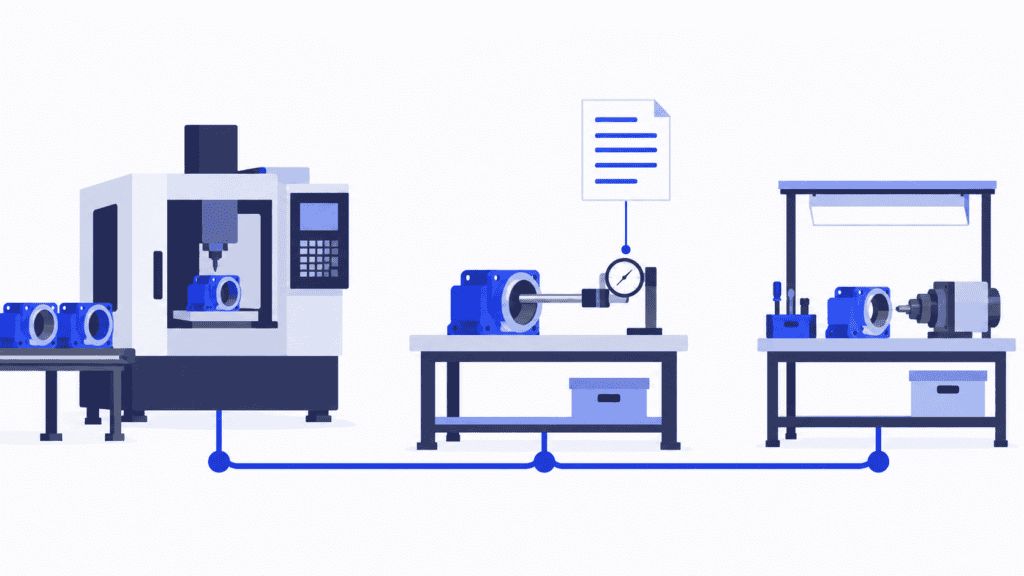
Imagine a shop machining housings. Its approved plan identifies bore B as a controlled characteristic at operation 20. The row references the drawing tolerance and a defined bore-measuring instruction. For this hypothetical process, the agreed checks cover the first piece after setup, a specified interval during the run and a check after a relevant tool change.
The operator records results against the work order and inspection reference. If a result fails the defined criterion, the reaction calls for stopping the affected operation, identifying output made since the last accepted check and notifying the designated quality owner. That owner determines the assessment and treatment of the suspect output under the applicable procedure. Adjustment and an acceptable verification check are part of the defined restart conditions.
The requirement, method, timing, evidence and reaction all point to the same operation. “Measure bore B” alone would not provide that control. In your own plan, fill in the actual approved sample size, interval and method reference so the operator does not have to interpret what “regularly” means.
Now consider the production consequence. If verification needs a separate measuring resource, its queue matters. A machining slot is not enough to establish when the housing can move on. That inspection work belongs in the production plan too.
Keep the control plan current from launch to routine production
The controls needed while developing a process may differ from those used in stable production. Prototype work, pre-launch activity and routine production can therefore need different plans or clearly identified control arrangements. Temporary additional checks need an owner and a defined basis for removing them, not an assumption that they will disappear when the launch feels complete.
For automotive work using AIAG guidance, consult the separate Control Plan 1st Edition manual and the applicable customer requirements. AIAG identifies Safe Launch among the updates to that manual. Do not assume an older APQP template describes the current requirements for your programme, or that every manufacturer must use the same automotive arrangements.
Once the plan is in use, review it when a product or process change affects the controls, when a failure exposes a gap, or when better process evidence supports an approved improvement. A different machine, tool, material source or measuring method can change more than the wording in one cell.
Make the update complete:
- Reconcile the changed control with the drawing, process flow, risk analysis and instruction references that it affects.
- Obtain the approvals required by your organisation and customer before implementing the change.
- Identify which products and work orders use the revised arrangement, and remove obsolete instructions from points of use.
- Update the planned work, resource assignments and durations if the control changes the production workload.
- Check on the floor that the revised method is being followed and that its records and reactions work as intended.
A plan can be correctly revised and still be ineffective if the previous instruction remains beside the machine. Maintenance is finished when the right people can perform the current control on the right work, not when a new file has been saved.
Schedule control-plan work with SkyPlanner
SkyPlanner APS is production planning and scheduling software. Its AI, Arcturus, places modelled production steps on eligible workstations using the configured durations, shifts, capacity and dependencies. The Gantt timeline makes the resulting sequence visible. That is valuable when an inspection bench, test station or measuring machine is shared by several orders.
Represent a separate inspection or test as a process step where it consumes distinct capacity or determines the sequence of work. Give it the appropriate eligible resource, duration and relationship to the other steps. A short check performed within a machining operation may instead belong in that operation’s planned time. The model should reflect how the work is actually done, rather than turning every control-plan row into another scheduling job.
Arcturus can then schedule that inspection load alongside the rest of production. You see the delivery consequence of a busy test station rather than discovering it after machining is complete. When priorities or recorded capacity change, recalculation saves you rebuilding the affected work queues by hand. You decide the priorities; the AI calculates the schedule around the configured rules.
For the housing example, the benefit is straightforward: plan the machining, any separately resourced verification and the following work as one connected route. The planned dependency represents the sequence. The acceptance decision still follows your quality process; a scheduled or completed job is not itself proof that a measurement passed.
Put the relevant instruction beside the job
SkyPlanner supports production notes and attachments on orders, order items and process steps. Use that context to make the applicable instruction and a useful production note available with the work, reducing the separate document search needed to perform it.
Your approved master-document process determines which version applies. The practical handover is to connect that applicable instruction to the affected job and ensure the route contains the work it requires. Together, the schedule and job context save the planner and operator from piecing the same information together in different places.
SkyPlanner integrates with any ERP or MES through its open REST API. You can keep the existing systems responsible for their agreed records and connect production data to a shared finite schedule instead of replacing them to solve the scheduling problem.
Use your own AI assistant to work with the plan
You can also work with SkyPlanner through your own AI assistant, such as Claude, ChatGPT or Microsoft Copilot, using the released MCP connection. MCP connects the assistant to SkyPlanner’s data and functions, so you can explain what you need in ordinary language. The assistant combines product knowledge with your production context and can use permitted functions on your behalf.
For example, ask it to review the workload on the measuring workstation and explain which orders are waiting for their planned inspection step. That gives you a more convenient starting point for a planning decision than manually assembling the same picture from several views. Changes use the access authorised for the connection; your quality requirements and production priorities remain yours to decide.
What a shared production plan changes in practice
UTU, a Finnish switchboard and switchgear manufacturer, previously planned through department-specific spreadsheets. Changes in the ERP’s work sequence did not always reach the shop floor. Its SkyPlanner implementation brought the Ulvila factory’s lines and departments into one system, with capacity, load and the work sequence visible together. UTU reports that an updated work queue reaches the line in seconds.
That is relevant when quality and production need to work to the same sequence: the plan has to reach the people doing the work. UTU’s SkyPlanner review shows what a shared, up-to-date view changes in daily production planning.
Bring one route and its controls into a workable schedule
A useful manufacturing control plan does more than name checks. It tells people what must be controlled, how and when to check it, what evidence to retain and how to react. The next step is to give that work a realistic place in production.
Book a SkyPlanner demo with one product route, its agreed inspection workload and the resource that is hardest to share. See how machining, inspection and the other orders competing for capacity fit together, with the relevant instructions available alongside the work.
If you prefer to explore first, try SkyPlanner with demo data or use the AI-assisted Getting Started in SkyPlanner Assistant. Start with the scheduling question that matters: does the plan allow time for all the work needed before you promise the delivery?
Jussi Mäntylä
Production Planning Specialist, SkyPlanner


