





In this article
- VMI, consignment and min–max inventory are different decisions
- How vendor managed inventory works
- When is VMI a good fit for a manufacturer?
- Decide who can do what before the first replenishment
- Share information that supports a real replenishment decision
- When supply changes, update the production decision too
- Turn VMI supply into a workable schedule with SkyPlanner
- Work through your own AI assistant
- What material visibility changed at Eskomatic
- Start with a pilot that tests the whole loop
Home » Resources » Vendor Managed Inventory: Make VMI Work for Production
Estimated reading time: 10 minutes
Vendor managed inventory (VMI) is an arrangement in which a supplier monitors agreed inventory information and takes responsibility for deciding when and how much to replenish, within rules agreed with the buyer. Instead of your purchasing team initiating every routine replenishment, the supplier acts on the stock and demand information you share.
For a manufacturer, the attraction is straightforward: less time chasing repeat orders, better visibility for the supplier and fewer surprises around frequently used materials. But handing over replenishment does not hand over responsibility for your production commitments. A component can be on its way and still arrive too late for the work you have promised.
Good VMI connects two decisions: what the supplier needs to replenish, and what your factory can actually produce with that supply. SkyPlanner APS helps with the second, bringing material availability and production capacity into one schedule so that supplier updates lead to a workable plan rather than another round of manual queue changes.
VMI, consignment and min–max inventory are different decisions
VMI answers who manages replenishment. Consignment answers who owns the stock. A min–max policy answers how replenishment quantities are controlled.
Under a consignment arrangement, stock at your site remains supplier-owned until the agreed ownership-transfer event, often consumption or withdrawal. VMI can operate with consigned stock or with stock you own. The replenishment arrangement alone does not establish payment terms, ownership or when an invoice becomes due.
Likewise, a supplier may manage VMI using agreed minimum and maximum levels, but those levels are a policy within the arrangement. You can also run min–max replenishment yourself without VMI. Agree the responsibilities, stock policy and commercial terms separately; treating the labels as interchangeable leaves important decisions unresolved.
How vendor managed inventory works
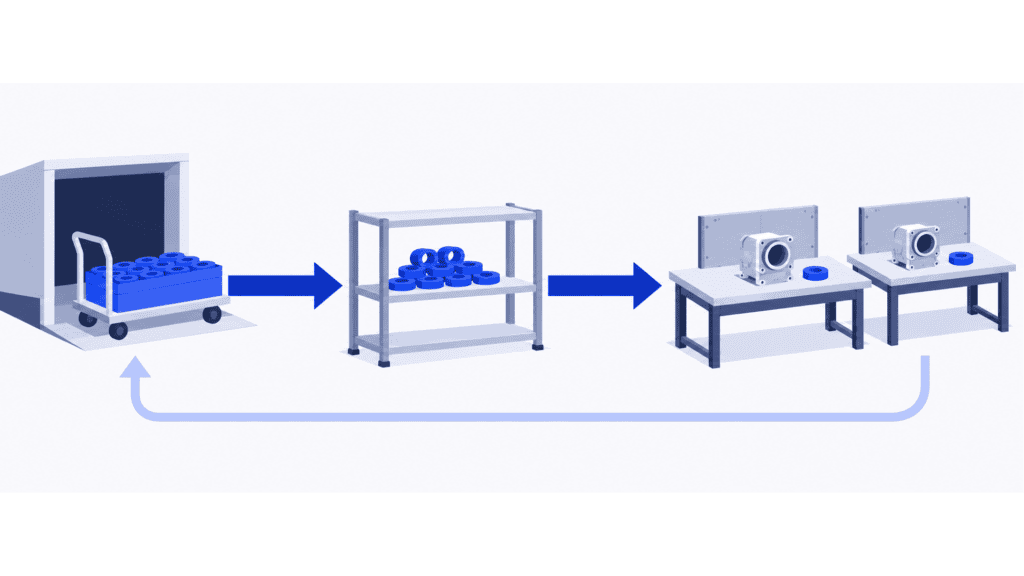
The operating loop begins with visibility. You share the agreed inventory position, consumption and relevant future demand. The supplier reviews that information, determines the replenishment needed and communicates the proposed or confirmed delivery under your agreement.
Your team receives the goods, records any discrepancies and updates the inventory information. Production consumption feeds back into the next replenishment decision. Depending on the agreed process, the supplier may replenish within an existing authorisation or submit a request for approval. VMI does not, by definition, eliminate purchase orders or approvals.
The loop works best when both sides understand what the data means. A stock figure that includes material awaiting inspection is different from stock ready for assembly. A forecast is different from a committed requirement. A shipment leaving the supplier is different from material available at the point of use.
These distinctions let the supplier act earlier without forcing your planners to guess what has actually been promised.
When is VMI a good fit for a manufacturer?
Start with recurring consumption and an operationally capable supplier. Standard fasteners, packaging, common components and regularly used raw materials are useful candidates when their demand, lead times and stock positions can be made visible. The strongest opportunity is often a family of items that consumes a lot of purchasing attention despite being replenished in a repeatable way.
The potential benefits come from changing that daily work:
- Less routine purchasing effort. Your team can spend less time checking the same stock lines and raising repetitive replenishment requests.
- Earlier supplier planning. Consumption and demand visibility give the supplier more warning than a purchase order placed only after a shortage appears.
- Better inventory balance. Jointly reviewed stock targets can reduce unnecessary accumulation while protecting the availability production needs.
- Faster exception handling. An agreed warning and response process makes a late replenishment a shared decision rather than a surprise at the machine.
There are trade-offs. The supplier takes on monitoring and planning work and needs enough business to justify it. Your company shares operational information and becomes more dependent on the partner’s ability to interpret it and respond. Excess stock can still build up if the supplier sees consumption but misses a product phase-out or revision change.
VMI is a weaker starting point for isolated project purchases, rapidly changing specifications or items with unreliable stock records. Variable demand does not automatically rule it out, but it makes forward information and exception handling more important. A supplier cannot prepare for a production surge that your company never communicates.
Nor does VMI remove the need for safety stock. Review buffers against consumption variation, replenishment lead time, supply reliability and the cost of a shortage. Changing who replenishes the item does not make those risks disappear.
Decide who can do what before the first replenishment
The practical question is not simply whether the supplier will “manage the stock.” It is which decisions the supplier may take independently and when your team must become involved.
Give the supplier a defined replenishment responsibility. Specify the covered item codes, revisions and locations; the stock targets or other agreed replenishment policy; review frequency; delivery lead times; pack sizes; and delivery windows. Define whether the supplier may adjust stock targets or must ask your buyer first. State how replenishment becomes an authorised commitment.
Keep the manufacturer’s responsibilities explicit. Your company provides accurate consumption and inventory information, communicates production-demand changes and receives goods through its normal acceptance process. Assign an owner for stock discrepancies, missing updates and changes to specifications. Purchasing and production should not assume that the other team has warned the supplier.
Agree exceptions together. Decide who responds to a projected shortage, delayed shipment, rejected delivery, excess stock or obsolete revision. Include how quickly the issue must be acknowledged and who can approve expediting, an alternative source or a change in quantity. A substitute component still needs the appropriate technical approval; a replenishment agreement is not permission to change the product.
Also settle ownership, payment, access to data and the handling of remaining stock when the arrangement ends. These commercial decisions deserve their own agreement rather than assumptions attached to the VMI label.
Share information that supports a real replenishment decision
Give the supplier enough information to act, with agreed definitions and an update frequency suited to the material risk. Useful information usually includes:
- Item and location identity: matching part codes, revisions, units of measure and delivery or storage locations.
- Usable stock and consumption: available quantities, recorded usage and adjustments, with held or rejected material distinguishable from usable supply.
- Demand ahead: relevant production requirements, forecasts, planned shutdowns, promotions or other known changes, clearly distinguishing firm demand from an estimate.
- Supply already in motion: outstanding replenishments, confirmed quantities and dates, goods in transit and actual receipts, so the same supply is not counted twice.
- Operating limits and alerts: agreed stock targets, shelf-life or storage constraints where relevant, exception thresholds and named contacts.
Choose the exchange method around the operating need. An agreed integration or supplier system can carry the data; what matters is that both parties receive timely, consistent information and can detect a failed update. Avoid giving the supplier broader system access than the replenishment task requires.
Test the meanings as well as the connection. If your system records cartons and the supplier plans in individual pieces, a successful data transfer can still produce the wrong replenishment. Reconcile a real item’s stock, usage and incoming quantities together before relying on the flow.
When supply changes, update the production decision too
Imagine an assembly plant that uses the same bought-in fitting across several products. Its VMI supplier normally replenishes on a weekly route. Then a customer brings forward an order, pulling more fittings into the next two days. The stock balance still looks comfortable against the usual minimum, but the new assembly sequence will consume it before the next delivery.
The buyer and supplier need to agree whether an earlier replenishment is possible and confirm its quantity and arrival. The planner has another decision to make: which assemblies can run before that delivery, and what happens to later operations and customer dispatches?
Checking the supplier’s stock target cannot answer that. Even an expedited delivery does not create another shift on the assembly line. The material and the available capacity must fit together.
Use the same response routine for a delayed or short shipment: establish the usable quantity and credible availability date, update the shared information, then review the affected production commitments. Keep a named owner until the exception is resolved. Otherwise, an updated supplier email can sit beside an unchanged machine queue.
Turn VMI supply into a workable schedule with SkyPlanner
SkyPlanner APS connects the material situation with the work that needs it. With material-aware scheduling enabled, its AI scheduling engine, Arcturus, uses maintained material balances alongside workstation capacity, shifts, process-step dependencies and your configured priorities. The resulting Gantt schedule shows how the orders fit through production.
Materials linked to a product carry through to the order item. Stock balances can be kept current through integration or managed in SkyPlanner’s Warehouse module. Purchase-order delivery dates provide expected material availability; confirming the purchase as delivered updates the stock. Keep that information aligned with the quantities and timing your factory can actually use, including any required receiving checks.
For the planner, the benefit is less reconciliation between a replenishment list and separate machine queues. When an agreed delivery changes, update the planning information and let SkyPlanner recalculate the work around the new supply and capacity situation. You can then review the effect on order completion, adjust priorities where needed and give colleagues a clearer answer about delivery commitments.
SkyPlanner integrates with any ERP or MES through its open REST API. Your agreed supplier-replenishment process can remain in the systems that handle it, while updated stock, purchase and production data support a common production schedule. You do not need to replace a working ERP to stop rebuilding production sequences by hand.
Work through your own AI assistant
You can also work through your own MCP-connected AI assistant. Claude, ChatGPT and Microsoft Copilot are examples of the kind of assistant you may already use; MCP provides the connection to SkyPlanner’s data and functions.
Instead of finding each relevant order and queue yourself, describe the question: “Which orders need this fitting, what incoming supply is recorded, and how are their production steps scheduled?” The assistant can combine SkyPlanner data with product knowledge to help you understand the situation and, with the appropriate permissions, use SkyPlanner’s functions. You set the priorities; Arcturus performs the scheduling calculation.
That makes the information easier to work with when a supplier update needs a production answer, not just another status report.
What material visibility changed at Eskomatic
Contract machining company Eskomatic previously organised work queues largely by hand, with limited visibility into material availability. Shortages could become apparent too close to a job’s planned start. Its SkyPlanner implementation connected existing ERP data with visual work queues and automated load scheduling.
Eskomatic reports fewer production stoppages caused by material shortages and more accurate delivery-date setting. Its experience shows the value of connecting the material picture with daily scheduling: planners can see the upcoming work more clearly and respond earlier. That is the scheduling benefit to look for alongside your own VMI arrangement.
Start with a pilot that tests the whole loop
Choose a manageable item family and a supplier willing to review the arrangement with you. Before changing responsibilities, record how the current process performs: stock availability, inventory held, emergency replenishments and the purchasing effort involved. Define each measure so that both sides count the same events.
Then test the operating loop from end to end. Confirm the opening stock, validate consumption updates, agree replenishment authority and follow a delivery through receipt into the production plan. Include an exception such as a demand change or a late delivery; a pilot that only follows normal consumption will tell you little about how the arrangement copes under pressure.
Review availability and inventory together. Fewer stockouts achieved by filling every shelf may not be a worthwhile improvement. Likewise, a lower average stock level is not a success if planners spend more time expediting parts and moving jobs. Use the review to adjust item scope, targets, update frequency and responsibilities before expanding.
The aim is a simpler replenishment process and a factory that can act on the result. To see how that second part would work, book a SkyPlanner demo with one recurring component, its confirmed replenishment and the orders competing for it. You can review how material availability and capacity shape their schedule. If you prefer to explore first, try SkyPlanner with demo data or use the AI-assisted Getting Started in SkyPlanner Assistant.
Jussi Mäntylä
Production Planning Specialist, SkyPlanner


