





In this article
- What should incoming inspection check?
- A practical incoming inspection process
- 1. Prepare the requirements before the delivery arrives
- 2. Receive, identify and control the material
- 3. Inspect and record the result
- 4. Decide what happens to the lot
- 5. Update availability and the production plan
- Should you inspect every item or use sampling?
- The release handoff: a short checklist
- Turn material release into a realistic schedule with SkyPlanner
- Why a shared plan is worth the change
- See the effect of a material hold on your own orders
Home » Resources » Incoming Inspection: From Receipt to Production Release
Estimated reading time: 10 minutes
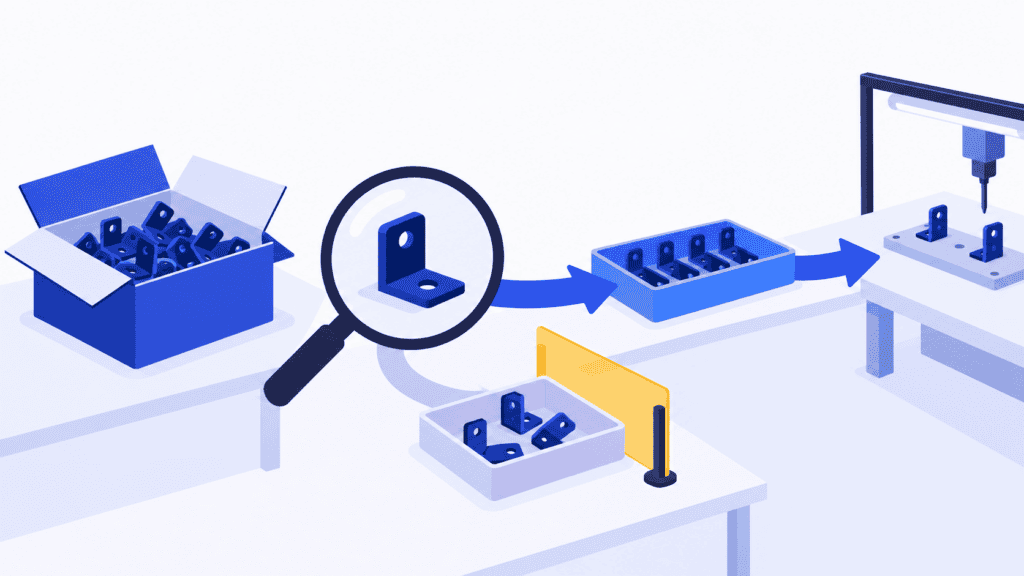
Incoming inspection is the verification of purchased materials, parts or components against specified requirements before they are released for use. Also called receiving inspection, it connects what your supplier delivered with what your factory can safely put into production.
The distinction matters on a busy receiving dock. A delivery can be physically present, counted and entered into inventory while it is still awaiting a dimensional check or a required certificate. If production treats that receipt as available material, the next machine queue may already be built on a false assumption.
A useful incoming inspection process therefore ends with a clear decision: which material is released, how much is usable and what remains on hold. Carry that decision into production planning, and you can respond to a shortage before it becomes an idle shift or a missed delivery. SkyPlanner APS helps turn the updated material situation into a workable schedule across the orders and resources competing for it.
What should incoming inspection check?
Start with the requirements for the item, not a generic checklist applied equally to everything. A bought-in machined part, an electronic component and a temperature-sensitive raw material need different evidence.
For each receipt, establish the relevant checks:
- Identity: correct supplier, part number, revision and material grade, with lot, heat or serial identification where required.
- Quantity: delivered amount and units of measure compared with the purchase order and delivery documents.
- Condition: damage, contamination, packaging integrity and any specified transport or storage conditions.
- Documents: the required certificates, test reports or other evidence, matched to the actual material received.
- Product characteristics: the dimensions, appearance, composition, function or other properties specified in the inspection plan.
A certificate is useful only when it covers the right material and provides the evidence your requirements call for. A matching part number does not resolve a wrong revision, and an intact box does not demonstrate that a critical dimension is within tolerance.
Keep the scope distinct from first article inspection. Incoming inspection addresses a received delivery lot. First article inspection verifies an initial production article against the applicable requirements and produces its associated evidence. Approval of a first article does not, by itself, settle the acceptance of every later delivery.
A practical incoming inspection process
The following workflow gives receiving, quality, purchasing and production a common path from arrival to use. Assign the responsibilities to named roles in your own operation; the same person may hold more than one role in a small factory.
1. Prepare the requirements before the delivery arrives
Make the current drawing or specification, purchase requirements and inspection instructions available to the people doing the work. Define what must be checked, the acceptance criteria, the sampling method where applicable and who can authorise release.
Also decide what evidence must arrive with the shipment. Asking for a missing material certificate after the machine has been reserved creates an avoidable delay. Purchasing can make that requirement clear to the supplier before dispatch.
Match inspection effort to the consequences of failure, the applicable requirements and the supplier’s performance. Do not reduce a required check merely because the delivery is urgent. If external testing is needed, include its turnaround time in the expected availability rather than assuming receipt day is production day.
2. Receive, identify and control the material
Record the receipt and check identity, count and obvious shipping damage. Preserve the link between the physical material, its supplier lot and its documents. Do not mix an unverified delivery into released stock in a way that destroys that distinction.
Use a designated holding area, clear status identification and the appropriate system controls to prevent material awaiting a decision from being picked as released stock. Large items that cannot fit in a holding area still need an unambiguous status.
Receiving confirms what arrived. Quality release confirms what may be used. Those events can happen close together, but they should not become indistinguishable simply because both affect an inventory record.
3. Inspect and record the result
Perform the specified checks with suitable equipment and the current instructions. Where measurement is required, use measuring equipment whose suitability and calibration status meet your quality process.
Record enough evidence to support the decision later: what was inspected, which requirement applied, the result, the material identification, who performed the inspection and when. For a dimensional check, an actual result linked to its tolerance is more useful than an unexplained tick.
If the required evidence is missing, record that explicitly. A missing report and a measured nonconformance are different problems, even if both prevent release for now. The distinction helps purchasing obtain the right response from the supplier.
4. Decide what happens to the lot
The authorised person decides whether the material meets the release requirements. Accepted material receives a clear released status. Material awaiting more evidence remains on hold, with an owner and a next action.
For a nonconformance, identify the affected scope, record the discrepancy and prevent unintended use. Depending on the approved disposition, the next step may be supplier return, replacement, sorting, rework or rejection. Any use under concession needs the approval required by the applicable process; a production deadline is not that approval.
Keep partial release precise. If an independently identified portion can legitimately be accepted, record exactly which quantity and identity are released and what remains held. Do not turn an ambiguous delivery-level note into permission to use every container.
5. Update availability and the production plan
Communicate the released quantity promptly. If material remains held, give planning the best supported expected availability, the unresolved issue and who owns the next update. A supplier’s promised response tomorrow is not the same as a confirmed release tomorrow.
Update the planning data as well as the quality record. Otherwise the warehouse may correctly show a hold while the schedule continues to consume the material. The practical handoff is usable quantity plus credible timing, connected to the orders that need it.
Then review the production consequences. Which jobs can continue? Which need a replacement lot? Can other work use the available capacity while the issue is resolved? This is where inspection stops being an isolated receiving task and starts protecting delivery commitments.
Should you inspect every item or use sampling?
There is no single inspection percentage that fits all incoming material. The choice depends on the requirements, the consequences of accepting a defect, the inspection method and the supplier situation. Destructive tests also change what is practical.
Acceptance sampling uses results from a randomly selected sample to make a decision about a defined lot. It does not demonstrate that every individual item is good. The plan needs a sample size and decision rules chosen in advance, not a convenient handful from the top of a box.
If the result calls for rejection, follow the defined lot-disposition process. Removing the defective pieces found in the sample does not automatically make the uninspected remainder acceptable. Further inspection or sorting may be part of an authorised response, but it is a separate decision.
For statistical background, NIST’s guide to lot acceptance sampling explains the difference between judging a lot and controlling the supplier’s process. Use the sampling scheme required for your application rather than treating a general example as an acceptance standard.
The release handoff: a short checklist
Before closing an incoming inspection, make sure the next person can answer these questions without another phone call:
- Which material? Supplier, item and revision, with the relevant receipt and lot references.
- What was decided? Released, still held or rejected, with the inspection evidence and authorised decision.
- How much can be used? The exact released quantity and units, separately from the held or rejected amount.
- What is still unresolved? Missing evidence, further testing, supplier response or approved corrective work, with an owner and next update time.
- What does production now know? Updated usable availability and the affected jobs or commitments requiring review.
Review ageing holds regularly. A hold without an owner can quietly become a planning assumption, especially when the goods have been sitting in the building for days. Recurring defects and document failures should also feed back into supplier management, so the same issue is not rediscovered on every delivery.
Turn material release into a realistic schedule with SkyPlanner
Imagine a delivery of 1,000 components in two separately identified sublots. The required checks are complete for one sublot of 600, which is released. The other 400 remain on hold because required evidence is missing.
Two production orders need 400 and 350 components. The released 600 cannot cover both orders. If the first order receives priority, 200 remain for the second: not enough for its full requirement. Counting the entire delivery as usable would hide the shortage; releasing the 600 does not make the remaining 400 available by implication.
Even once you resolve the material allocation, both orders may need the same assembly station and later test capacity. Moving one job changes space for other work. A receiving list can show the right material status without telling you how all those operations now fit together.
SkyPlanner APS brings material availability and production capacity into the same scheduling calculation. With material-aware scheduling enabled, its AI engine, Arcturus, uses maintained material quantities alongside workstations, shifts, process-step dependencies and your scheduling priorities. The Gantt timeline shows the resulting work sequence and completion dates. You spend less time reconciling a material list with separate machine queues and more time deciding how to protect the important deliveries.
SkyPlanner integrates with any ERP or MES through its open REST API. Material balances can be kept up to date through integration or managed with inventory transactions in SkyPlanner’s Warehouse module. During implementation, agree how the quality decision becomes usable availability in that planning data, including partial releases and changed expectations for held material.
That handoff matters because an arrival confirmation is not quality approval. In SkyPlanner, a purchase order’s delivery date represents expected availability, and marking it Delivered updates stock. Make sure the agreed data flow reflects what production may actually use; the inspection and release decision belongs to your quality process.
You can also work through your own AI assistant, such as Claude, ChatGPT or Microsoft Copilot. SkyPlanner’s MCP connection links an authorised assistant to SkyPlanner’s data, product knowledge and functions, so you can explain the planning task rather than reconstruct it across screens. For example, ask which orders depend on a held component, then have the assistant help use SkyPlanner’s functions to update the plan within your permissions. Arcturus performs the scheduling calculation; you set the priorities. The assistant does not replace the authorised material-release decision.
Why a shared plan is worth the change
At electrical equipment manufacturer UTU, production planning once relied on department-specific spreadsheets. Changes in the ERP’s production sequence did not always reach the shop floor. SkyPlanner brought the factory’s lines and departments into one planning system, integrated with its ERP; UTU reports that an updated work queue reaches installers in seconds.
UTU’s SkyPlanner review shows the value of moving beyond separately maintained plans. For the team managing incoming material, the same planning principle is useful: once availability changes, the production sequence needs to reflect it where the work is actually assigned.
See the effect of a material hold on your own orders
A sound incoming inspection process gives you a decision you can trust. SkyPlanner makes that decision useful for scheduling: which work can run, where it fits and what the updated plan means for delivery.
Book a SkyPlanner demo with one real incoming component, its released or expected usable quantity and the orders competing for it. Use that situation to explore how material availability and finite capacity change the plan together.
If you prefer to explore first, try SkyPlanner with demo data or use the AI-assisted Getting Started experience in SkyPlanner Assistant. You can see how the scheduling works before mapping your own inspection-to-availability handoff.
Jussi Mäntylä
Production Planning Specialist, SkyPlanner


