





In this article
- What is job shop scheduling?
- Job shop, flow shop and make-to-order are different concepts
- A worked example: should the free mill start the next job?
- Choose priorities for complete orders, not isolated queues
- Build the job-shop plan in SkyPlanner
- 1. Give each operation a credible route and duration
- 2. Model the capacity that can actually do the work
- 3. Set priorities and protect the work that must stay put
- 4. Read the result through to the last operation
- When production changes, recalculate the connected plan
- What this changed for Mamec
- Give your job shop a plan the floor can follow
- Frequently asked questions
- What is the difference between scheduling and dispatching?
- Can a job shop schedule be built in Excel?
- Does a shorter schedule always mean better delivery performance?
The mill is free, a housing is ready, and a supervisor wants to keep production moving. Starting it looks like the obvious decision. But in an hour, an urgent pin will arrive from the lathe and need that same mill. Once the housing starts, the pin’s delivery date is already in trouble.
This is the daily challenge of a job shop: each machine’s next job affects orders moving through other machines. A busy workstation does not necessarily mean the shop is delivering the right work.
Job shop scheduling connects those decisions. It puts each order’s operations into available resource time while keeping its route and delivery priority intact. SkyPlanner APS does the scheduling calculation for you, so the supervisor’s next-job queue comes from a coordinated plan rather than another round of expediting.
What is job shop scheduling?
Job shop scheduling is the assignment and sequencing of manufacturing operations across shared resources when jobs can follow different routes. It determines where each operation runs, when it starts and finishes, and how it fits with the rest of the job.
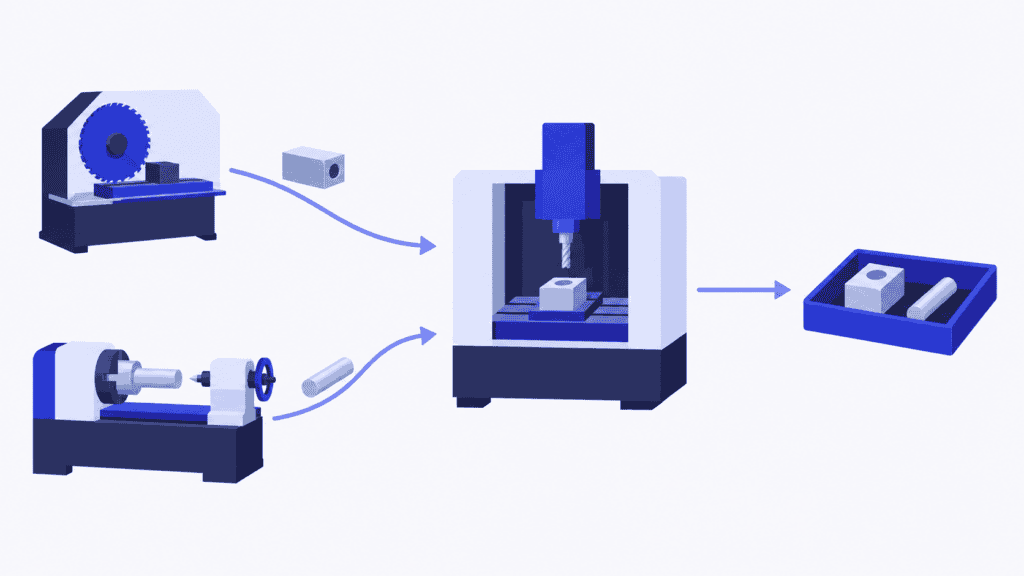
A housing might pass through sawing, milling and inspection. A pin might need turning, milling and inspection. They share the mill, but neither order follows a single production line. Another part may visit the same equipment in a different sequence.
The important unit is the operation, not just the order. Knowing that an order needs five hours of work does not tell you which machine needs those hours or when its next operation becomes ready. The manufacturing routing supplies that sequence; the schedule assigns the work to time and resources.
Two fundamental conditions keep the schedule feasible:
- An operation must respect the preceding work it depends on.
- A resource must not be assigned more simultaneous work than it can perform.
In the classical job-shop scheduling problem, operations have specified machines and run without interruption. A real factory adds working shifts, setup time, people, tools, material availability and reported progress. These are not details to tidy up later: they decide whether the next job can actually start.
Job shop, flow shop and make-to-order are different concepts
In a flow shop, jobs follow the same machine sequence. In a job shop, routes can differ. A flexible job shop also allows some operations to run on a choice of eligible machines, adding the decision of where to run them.
Make-to-order describes what triggers production—a customer order—not the route through the factory. A make-to-order manufacturer can use job-shop routes or a common flow route. Small batches and custom products are common job-shop situations, but neither is a definition of job shop scheduling. High-mix, low-volume manufacturing adds a different question: how to offer a wide product range without letting preparation and changing workloads consume the margin.
This guide focuses on the job-shop part of production scheduling: coordinating different routes through the resources they share.
A worked example: should the free mill start the next job?
Imagine two orders ready to enter production at 08:00. Each workstation has its own operator, all resources are available throughout the example, and the times below include all the work needed at that step. There are no additional setups, breaks or transfers. Each operation must finish before the next begins, and once started it runs uninterrupted.
| Order | Route and operation times | Required completion |
|---|---|---|
| Housing | Saw: 1 hour → Mill: 3 hours → Inspection: 1 hour | 15:00 |
| Pin | Lathe: 2 hours → Mill: 1 hour → Inspection: 1 hour | 12:00 |
The saw cuts the housing from 08:00 to 09:00. At the same time, the lathe turns the pin from 08:00 to 10:00. At 09:00, the housing is ready for the mill, but the pin is not.
If the mill takes the first ready job, the housing runs from 09:00 to 12:00. The pin waits, then runs from 12:00 to 13:00. Inspection finishes the housing at 13:00 and the pin at 14:00. The machines have followed valid routes, but the pin is two hours late.
If the schedule protects the pin’s deadline, the mill waits until 10:00, mills the pin until 11:00, then mills the housing until 14:00. Inspection finishes the pin at 12:00 and the housing at 15:00. Both orders meet their deadlines.
| Result | First-ready sequence | Deadline-protecting sequence |
|---|---|---|
| Milling order | Housing, then pin | Pin, then housing |
| Pin completion | 14:00 | 12:00 |
| Housing completion | 13:00 | 15:00 |
| Both orders complete | 14:00 | 15:00 |
| Delivery commitments | Pin late | Both met |
The hour of idle milling time is deliberate. Filling it with an uninterrupted three-hour operation would block the urgent order. Finishing the whole set earlier is also not automatically better: the first sequence completes everything at 14:00 but misses the pin’s promise.
A planner can see this trade-off with two orders. With hundreds of operations, the same question appears across many queues at once. SkyPlanner’s value is handling that connected scheduling work while you decide which commitments take priority.
Choose priorities for complete orders, not isolated queues
A dispatching rule chooses which ready operation runs next at a workstation. A schedule looks across the planning period and the whole route. Dispatching is useful, but a local rule needs to serve the wider delivery plan.
| Method | What it favours | What to watch |
|---|---|---|
| First come, first served | Work that arrived first | An urgent later arrival can wait behind less time-sensitive work |
| Earliest due date | The closest order deadline | A later-due order may have much more work remaining |
| Shortest processing time | Quick ready operations | Long operations can keep losing their place |
| Least slack | The smallest gap between time available and remaining work | Unrealistic remaining-time estimates give misleading urgency |
| Setup-oriented grouping | Similar work run together | Setup savings can come at the expense of a delivery commitment |
No single rule resolves every job-shop conflict. In the example, the pin is not even ready for the mill when the housing arrives. A rule that only ranks the ready queue cannot account for the pin unless the wider plan protects its upcoming capacity.
Mathematical optimization and heuristic search methods tackle that wider problem by comparing assignments and sequences under constraints. The objective matters: minimizing makespan, the time until all jobs finish, is different from minimizing lateness or protecting a particular customer order. You do not need to choose an algorithm to run your shop, but you do need to tell a scheduler what a good result means.
For delivery-driven production, begin with order completion dates and priorities. Then examine bottleneck loading, setup effort and work in progress. A schedule that looks efficient but produces late urgent orders is solving the wrong business problem.
Build the job-shop plan in SkyPlanner
SkyPlanner brings operations, workstations, shifts, operators, priorities and materials into a finite production schedule. Its scheduling AI, Arcturus, calculates operation placement against the configured resources and dependencies. The Gantt view shows the result as workstation queues and connected process steps.
The practical benefit is that you no longer have to rebuild each machine’s queue separately to understand one order’s finish date. You can follow its scheduled route, see where it waits and review the effect of a change on other work.
1. Give each operation a credible route and duration
Define the process steps, their order and the workstations capable of performing them. Include processing and setup durations, as well as required waiting between steps. An alternative machine is useful only if it is eligible for that operation.
SkyPlanner schedules the routes you supply; Arcturus does not design the manufacturing sequence. Start with a representative product family and check the operation data with the people doing the work. A missing inspection or an optimistic setup estimate can make an attractive schedule impossible to execute.
SkyPlanner integrates with any ERP or MES through its open REST API. You can connect existing order and production data to scheduling instead of replacing a system that already handles those records well. Agree which system owns routes, due dates and progress updates so the schedule stays aligned with production. Explore SkyPlanner’s integrations.
2. Model the capacity that can actually do the work
Add workstation availability and working shifts, then account for operators and other relevant resource constraints. Two idle machines do not provide two simultaneous operations if both need the same operator continuously.
Finite-capacity scheduling prevents the plan from relying on capacity that has already been allocated. Material-aware scheduling, when enabled, also makes material availability part of the calculation. Keep that availability current rather than asking the floor to discover shortages after work has been released.
3. Set priorities and protect the work that must stay put
Use SkyPlanner’s dynamic priorities to steer the scheduling calculation toward the delivery and production factors that matter to your business. You decide the priorities; Arcturus calculates within them.
Use locks where assignments need protection—for example, near-term work that operators have already prepared. This is a useful balance: the wider schedule can adapt without treating every prepared job as movable. Locks are a planning decision, not a reason to freeze everything; too much protected work leaves less room to respond.
4. Read the result through to the last operation
Check the order’s completion, not only the first free slot or its next machine. In the housing-and-pin example, the milling sequence alone is insufficient: the pin still needs inspection before its 12:00 commitment.
The Gantt schedule makes assignments, waiting and downstream work visible. Use it to review threatened delivery dates and the resources causing them. If the required work still cannot fit, a different sequence may not be enough. Extra operated time, another eligible resource or a revised commitment may be needed; capacity planning helps you assess those choices.
See SkyPlanner’s scheduling features.
When production changes, recalculate the connected plan
A rush order, machine interruption or slower-than-expected operation changes more than one queue. Pulling an urgent job forward can consume the space another order needed later in its route.
Record the changed priority, capacity or progress in SkyPlanner, then let Arcturus recalculate around the new situation. Review the resulting completion dates before confirming the next promise. The useful question is not merely “can we squeeze this job onto the mill?” but “what happens to the orders already committed?”
With Autopilot enabled, SkyPlanner can trigger rescheduling from configured events or a timer while keeping your rules and locks in force. The plan can stay current without a planner continuously rebuilding it by hand. Accurate updates still matter: software cannot plan around a machine stop that nobody has recorded.
For the floor, the benefit is a clearer next-job queue. For the planner, it is time to deal with the exception—an important delivery, a capacity decision or a customer conversation—instead of moving every affected operation manually.
What this changed for Mamec
Mamec, a Finnish manufacturer of industrial mixing equipment and high-tech contract products, had thousands of interdependent work orders. Before SkyPlanner, supervisors prioritized work from delivery dates on paper orders. The ERP’s planning functions did not give the company an overall picture, and managing the dependencies by hand burdened production control.
Mamec chose SkyPlanner for its adaptability to a dynamic mix of work orders ranging from a few minutes to eight-hour runs. It integrated SkyPlanner with its existing Oscar ERP and made SkyPlanner its main production-planning platform.
AI-powered finite scheduling now puts work into order, while queues locked a week at a time give machinists clarity about what comes next. During a long run, they can prepare upcoming work. Staff can look up an order number to see its position and schedule, and management has a shared view of production load.
Mamec reports a clearly lighter planning workload, improved delivery reliability and less workstation downtime from the optimized work sequence. The lesson for another job shop is concrete: shared priorities and connected queues replace a production plan held together by paper dates and individual judgment.
Read Mamec’s full customer story. For another machining perspective, Eskomatic’s story shows the importance of material readiness and delivery-date planning.
Give your job shop a plan the floor can follow
When a delivery date changes, you should not have to reconstruct every machine queue to find out what it means. SkyPlanner combines automatic scheduling, a visible Gantt plan and your control over priorities and protected work. That is a better basis for deciding what runs next and what you can promise.
Book a SkyPlanner demo with a typical order route, your most contested resource and a recent change that was difficult to schedule. See how the work connects and how a priority change affects the plan. Or try SkyPlanner with demo data to explore the scheduling view first.
Frequently asked questions
What is the difference between scheduling and dispatching?
Scheduling assigns operations to resources and times across a planning period. Dispatching selects or releases the next ready operation at a workstation. In a job shop, that local choice should follow the wider plan because it affects orders whose next operation is on another machine.
Can a job shop schedule be built in Excel?
A small, stable set of operations can be represented in a spreadsheet. The difficulty is maintaining all the dependencies, resource conflicts and completion dates when production changes. If planners spend their day rebuilding queues, SkyPlanner APS is a more practical way to calculate and maintain the connected schedule.
Does a shorter schedule always mean better delivery performance?
No. A shorter makespan finishes the entire set of jobs earlier, but an individual order can still miss its deadline. Compare complete-order finish dates with delivery commitments, then consider setup effort, bottleneck loading and work in progress. The best schedule depends on the priorities you need it to serve.
Jussi Mäntylä
Production Planning Specialist, SkyPlanner


