





In this article
- What is a plan for every part?
- What information belongs in a PFEP?
- Build the first PFEP around a real material flow
- Trace the part, not just the records
- Validate the details that change the decision
- Choose the supply policy, then test it
- Example: why a full carton can still leave a cell short
- Give every important change a route back into the plan
- Connect material availability to production with SkyPlanner
- Measure whether the plan helps work continue
Home » Resources » Plan for Every Part (PFEP): Make Parts Ready for Work
Estimated reading time: 10 minutes
The part is in the building. Purchasing can see it on the inventory report. Yet the operator is waiting because nobody has agreed how it reaches this workstation, in which container, or who replenishes it when the bin empties.
A plan for every part, or PFEP, closes those gaps. It brings the supply, storage, handling and point-of-use instructions for each part into a maintained information base. The benefit is less searching, fewer improvised deliveries and fewer interruptions caused by a handoff that existed only in someone’s memory.
But a reliable parts plan also needs a reliable production plan. Use PFEP to define how materials reach the work, and SkyPlanner APS to connect material availability with the orders, operations and capacity that need them. Your team can spend less time reconciling lists and more time keeping production moving.
What is a plan for every part?
A plan for every part is a detailed record of how each part used in production is supplied, stored, handled and delivered to its point of use. PFEP is the common abbreviation. It supports lean material flow by making the practical requirements explicit: which part, how much is needed, where it goes, how it gets there and what triggers replenishment.
A part number and a stock balance are not enough. They identify the item and its recorded quantity, but do not explain whether a supplier carton can go straight to the line, whether the part needs protective handling, or how the night shift gets a replacement container.
The PFEP combines those facts with operating decisions and ownership. A useful test is whether someone unfamiliar with the part can follow its agreed journey without repeatedly asking how things are normally done.
Keep its role distinct from related tools:
- A bill of materials defines the components and quantities required to make a product. PFEP defines how those components are supplied and handled.
- Inventory records show stock and movements. PFEP specifies the policies and physical arrangements behind that flow.
- Kitting collects and verifies the parts for particular work. PFEP can specify that a part is supplied in a kit rather than held in a replenished line-side bin.
- ABC analysis helps allocate inventory-control attention by consumption value. That classification can inform a PFEP, but it does not define the part’s route to the operator.
These tools should share consistent identifiers, not compete as different versions of the same list.
What information belongs in a PFEP?
Include the information needed to make and maintain the supply decision. The table below is a practical starting structure, not a required number of columns.
| Information group | Details to establish | Decision it supports |
|---|---|---|
| Part identity | Unique code, description, relevant revision, stocking unit and purchase-unit conversion | Receiving, stores and production recognize the same usable item and quantity. |
| Demand and use | Products or operations consuming the part, usage pattern, point-of-use locations | Supply arrangements reflect where and when consumption actually happens. |
| Source and replenishment | Supplier or internal source, replenishment time, order frequency, order constraints | The team knows how replacement supply is triggered and how long it takes. |
| Packaging and handling | Supplier pack quantity, internal container quantity, dimensions, weight, protection needs | Containers fit the storage space, handling method and workplace. |
| Storage and delivery | Storage address, line-side position, delivery method, frequency and responsible role | The part has an agreed physical journey from receipt to consumption. |
| Control and maintenance | Replenishment signal, buffer policy, exception contact, data owner and last validation | Someone acts before supply fails and keeps the instructions current. |
Keep part-level facts separate from location-specific arrangements. If the same seal feeds several cells, each cell may need its own container quantity, delivery frequency and replenishment signal. One item code can therefore have several linked point-of-use records without becoming several conflicting part definitions.
Also distinguish a policy from today’s situation. A standard supplier lead time is planning data; a late shipment’s revised arrival is a current exception. A line-side target quantity is a policy; the usable quantity there now is operating information. Both matter, but updating one does not automatically correct the other.
Build the first PFEP around a real material flow
Start with a defined production area or product family where recurring shortages, searching or excess handling make the problem visible. The eventual aim may be every part, but a bounded pilot lets the team test the method before spreading unreliable assumptions across the plant.
Trace the part, not just the records
Walk selected parts from receipt through storage to their actual use. Involve purchasing, warehouse staff, material handlers and the people consuming them. Compare what happens with the ERP records, local lists and instructions.
Look especially for unofficial arrangements: a second storage position, a smaller container used on one shift, a supervisor who places an order when someone asks. These are often the missing links a clean item export will not reveal.
Validate the details that change the decision
Check codes, revisions, units and locations before choosing replenishment quantities. Make purchase packs and internal containers distinguishable. Record the time from an internal replenishment signal to usable stock at the workstation, not just the time a forklift spends travelling.
Supplier replenishment and internal delivery are different time windows. A frequent internal delivery route cannot compensate for an unplaced supplier order. Equally, stock arriving at the loading dock does not make it immediately usable at the machine if inspection or repacking still stands between them.
Mark unknown information for investigation with a responsible person. A blank lead time is a visible problem; an invented one can quietly become the basis for a bad supply rule.
Choose the supply policy, then test it
Decide whether the part should be held at the point of use, replenished through a supermarket (a controlled intermediate stock area), delivered in a kit or supplied for a specific order. Match the policy to usage, space, handling effort and shortage risk rather than giving every item the same treatment.
Set container quantities and replenishment triggers against consumption during the relevant replenishment window, allowing appropriate protection for uncertainty. Check physical space and handling constraints too. A larger bin is not a useful buffer if it blocks access or encourages damage.
Test the arrangement during real work. Can the handler see the signal? Can replacement stock arrive before the available supply is consumed? What happens when product mix changes or the usual person is absent? Revise the policy before expanding it.
Example: why a full carton can still leave a cell short
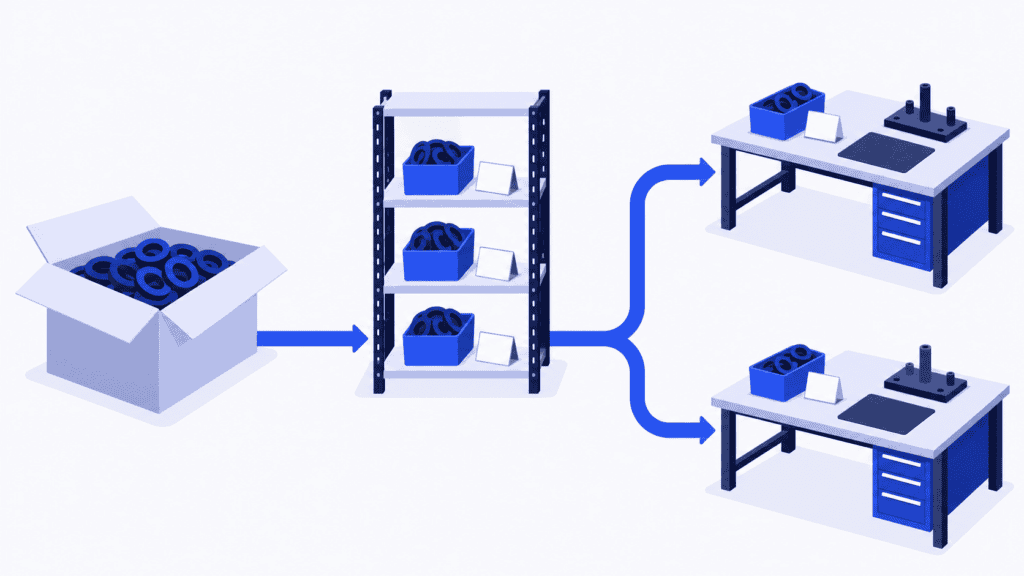
Imagine a manufacturer using the same seal in two assembly cells. Purchasing orders it by the carton, stores records it in pieces, and material handlers split it into smaller protective containers for the benches.
The first PFEP draft records the supplier, carton quantity and main storage location. It looks complete until the production mix changes. One cell consumes seals much faster, while the replenishment round still follows its old routine. There is stock in stores, but the cell waits.
The useful correction is not simply “buy more seals.” The team adds the separate points of use, their internal container quantities, replenishment signals and delivery responsibilities. It verifies the unit conversion and confirms who changes the supply arrangement when the production mix changes.
Now the seal has an operating plan rather than a purchasing description. The next step is to connect the orders consuming it to the available material and production capacity. Otherwise, a planner can still promise both cells the same supply or move an order without recognizing what that changes downstream.
Give every important change a route back into the plan
PFEP deteriorates when maintaining it becomes optional work after the urgent work is finished. Make updates part of the changes that affect supply.
Purchasing can own supplier terms, order constraints and confirmed changes to replenishment time. Logistics can own storage positions, containers and delivery arrangements. Engineering and quality can own relevant specification changes and approved handling requirements. Production can confirm points of use and changed consumption patterns. One PFEP coordinator keeps the overall structure and unresolved exceptions under control.
The coordinator should not have to discover every change personally. Give each field group an accountable owner, and connect updates to events such as:
- A new part, supplier, revision or approved substitution.
- A change in packaging, purchase unit or internal container quantity.
- A cell move, new point of use, changed shift pattern or product mix.
- Repeated shortages, damaged parts or an unexplained stock discrepancy.
For each change, record who approves it, when it takes effect and which downstream instructions or systems need updating. Replacing a label on the rack while leaving the delivery instruction unchanged is not a completed update.
You do not need to copy every field into a new database. Keep an authoritative source for each type of information and make its relationship to the PFEP clear. If purchasing terms live in the ERP and physical locations in the WMS, avoid creating separately editable copies with no synchronization responsibility. The goal is one dependable meaning, even when several systems contribute to it.
Review exceptions frequently enough to act, and periodically validate the physical arrangements. A record’s recent edit date is not proof that the container still fits or that the delivery route still works.
Connect material availability to production with SkyPlanner
PFEP makes material flow more dependable. SkyPlanner makes the production consequences of material availability easier to manage.
In SkyPlanner, materials linked to a product carry through to its order items. Stock information can be maintained through integration or directly in SkyPlanner’s Warehouse module. With material-aware scheduling enabled, Arcturus, SkyPlanner’s scheduling AI, uses material availability in the same calculation as workstation capacity, shifts, operation dependencies and your configured rules.
That connection is valuable when several orders use the same material or compete for the same machines. Instead of checking a material list and rebuilding each machine queue separately, you can review the connected schedule in the Gantt timeline. If the inputs change, recalculate to see how the work fits and which delivery commitments need attention. You set the priorities; Arcturus handles the scheduling calculation.
SkyPlanner integrates with any ERP or MES through its open REST API. You can keep the system maintaining your purchasing and item data while connecting the relevant identifiers, material requirements and availability to detailed production scheduling. Your PFEP’s handling and delivery instructions still guide the physical work: a recorded stock quantity does not confirm that an undamaged container has reached the correct bench.
At contract machining company Eskomatic, an older ERP and largely manual work queues made it difficult to build an overall picture, especially of material availability. With SkyPlanner connected to its existing ERP, the team gained clearer material visibility, automatic load scheduling and a visual work queue. Eskomatic reports fewer production stoppages caused by material shortages and more accurate delivery-date setting.
That is the practical reason to connect dependable parts information with scheduling: fewer surprises at planned starts and less time untangling the consequences by hand.
Measure whether the plan helps work continue
Judge the pilot by what changes at the point of use, not just by how many fields have been populated. Track interruptions caused by missing or wrong parts, emergency deliveries, searching time and the effort required to replenish the area. Review inventory and space alongside those results so an apparent improvement has not simply come from filling every available corner with stock.
When a shortage recurs, trace the failure. Was the record wrong, the replenishment signal missed, the supplier late or the schedule using outdated availability? Each cause needs a different correction. Update the policy or operating information that actually failed.
Choose SkyPlanner when reliable part information still leaves your planners manually matching materials to competing orders and machine queues. Book a SkyPlanner demo with one repeatedly missing part, an order that consumes it and another order competing for the same resources. Use that situation to explore how material-aware scheduling can make your next production decision easier. If you prefer to explore first, try SkyPlanner with demo data.
Jussi Mäntylä
Production Planning Specialist, SkyPlanner


