





In this article
- What is a spaghetti diagram?
- Choose the journey before drawing the lines
- How to make a spaghetti diagram on the shop floor
- 1. Prepare the layout and the observation
- 2. Trace the work as it happens
- 3. Record what each trip is for
- 4. Observe relevant repetitions
- Read the reasons for movement, not just the longest line
- Example: the inspection trip that keeps returning
- Check the improvement before claiming the saving
- Put the verified change into the production schedule
- A shared view makes manufacturing changes easier to manage
- Start with one journey and one change worth testing
Home » Resources » Spaghetti Diagram in Manufacturing: Map the Real Route
Estimated reading time: 10 minutes
A trip to the inspection bench seems harmless. So does collecting another container or walking back for a tool. Follow those journeys through a complete job, however, and you may find that the work keeps leaving the workstation for reasons nobody has questioned.
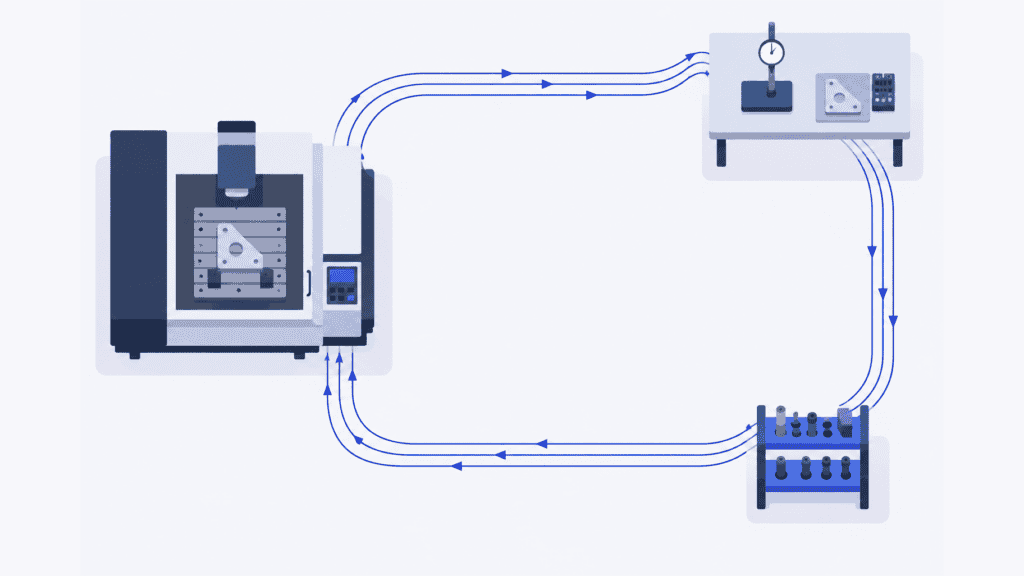
A spaghetti diagram makes those physical movements visible. Drawn over a floor plan, it shows where a person or material actually travels, including repeated trips, detours and returns. The useful result is not a tidier drawing. It is knowing which journeys to change and whether the change makes the work easier or faster.
Once you have verified an improvement, SkyPlanner APS helps put its production effect to use. Updated operation times and approved workstation assignments belong in the same schedule as the other orders using those resources, not in a separate improvement report.
What is a spaghetti diagram?
A spaghetti diagram is a trace of the physical path taken by a person, material or item through a work area. It is also called a spaghetti chart or spaghetti map. Lines follow the actual route over a layout, with arrows or numbered movements showing the sequence. Repeated and overlapping paths give the drawing its name.
In manufacturing, use it to investigate questions such as why an operator repeatedly leaves a machine, why a component crosses the same aisle several times, or why a material handler keeps returning to the same storage area.
Choose the tool for the question. A process flowchart explains the order of activities and decisions. Value stream mapping examines the wider material and information flow, including inventory and waiting. A spaghetti diagram examines the physical journey. It works in a functional job shop as well as inside a production cell.
The trace can reveal a reason to investigate delays, but its lines do not measure elapsed time or prove where the production bottleneck is. Record those observations alongside it.
Choose the journey before drawing the lines
Start with a problem narrow enough to observe: repeated trips for inspection during one machining operation, for example, rather than “too much movement in the factory.”
Follow a person when the question concerns walking, searching or interruptions to their work. Follow material when you need to understand its physical transfers between locations. These are different views: a part may stay beside a machine while its operator walks away, and a material handler may serve several parts on one trip.
Set a recognizable beginning and end. For an operator, that might be collecting the first blank through to placing the completed batch in its agreed location. For material, it might be leaving a staging area through to reaching the next operation. Record the product family, batch size, shift and relevant working conditions so the route has context.
A long-waiting component does not need an observer standing beside it all day. Record its arrivals and departures, observe the transfers, and keep the waiting intervals separately. If you use the next comparable batch to observe a later transfer, identify that substitution. Do not present several different journeys as one continuously observed part.
How to make a spaghetti diagram on the shop floor
You need a usable floor sketch, a way to record movements and a clock for observations you want to time. Paper is a practical starting point; a digital drawing is also useful if it does not distract you from the work.
1. Prepare the layout and the observation
Show the workstations, storage points, inspection areas, doors, aisles and obstacles that determine the route. Check that the sketch reflects today’s arrangement. A known scale or measured route lengths lets you calculate distance later; a rough, unmeasured sketch supports discussion but not precise distance claims.
Explain the purpose to the people involved: improve the work arrangement, not rank individuals by how far they walk. Agree the observation approach with the team and follow the site’s requirements for access and recording. Stay clear of operating equipment and vehicle routes.
2. Trace the work as it happens
Mark the start, record the time and follow the selected person or material. Draw each movement along the path actually used, around equipment and through the real access points. Do not replace an awkward detour with the straight line you think should be possible.
Use arrows and movement numbers to keep the sequence readable. Count the outward journey and return separately, including repeated trips along the same aisle. For several subjects, use separate sheets or clearly distinguished traces rather than an unidentifiable tangle.
Avoid coaching the person toward a better route during the observation. Record questions for the discussion afterward. Otherwise, you may measure your suggestion instead of the existing method.
3. Record what each trip is for
A dense cluster of lines tells you where movement repeats. Notes tell you why. Was the person collecting a missing tool, taking a required measurement, finding an empty container or checking information?
Keep a short movement record beside the sketch:
| Record | What to capture |
|---|---|
| From and to | Actual locations and direction, linked to the numbered trace |
| Frequency | Each passage during the observed job or cycle |
| Distance | Length of the route actually travelled, with the measurement method |
| Purpose | What the trip achieved and why it was needed |
| Time and interruption | Observed travel or waiting time, and whether production stopped |
| Context | Product, quantity, shift and any unusual event affecting the journey |
This is enough to distinguish a long, necessary delivery from a short trip repeated because something is missing. Review unclear movements with the person who did the work before deciding what caused them.
4. Observe relevant repetitions
One pass may show the route, but it cannot tell you how consistently it occurs. Observe further complete repetitions and retain the differences. A first-piece inspection, a replenishment trip and a recurring tool search should not be treated as the same frequency of activity.
There is no universal number of cycles that makes every study reliable. Cover the variations that could change your decision: a different batch size, another product route, or a shift with a different supply arrangement. If a breakdown dominates the observation, identify it rather than calling that journey typical.
For distance, multiply each route segment’s measured length by its observed number of passages, then add the segment totals. Keep the frequency and purpose visible alongside the total. They are often more useful for choosing a change than the final distance alone.
Read the reasons for movement, not just the longest line
Start with the repeated journeys and ask what would remove the need for them. A tool-search problem may call for 5S and an agreed point-of-use location. A return for missing packaging may need a replenishment rule. Neither necessarily requires moving a machine.
Long transfers between operations deserve a different discussion: can an approved operation use a nearer workstation, can staging change, or is the transfer serving several jobs efficiently already? A physical shortcut that makes another product family harder to produce may be a poor trade.
Treat crossing lines as questions, too. They show routes sharing space, not necessarily people arriving at the same time. Observe when interference actually occurs and review the arrangement with the people responsible for the area. A route that is shorter but obstructs access is not an improvement.
Example: the inspection trip that keeps returning
Imagine an operator machining a batch of brackets. The diagram shows repeated journeys from the machine to a shared inspection bench, back to the machine, then across the aisle to return the gauge. Another product family uses that bench as well.
The obvious proposal is to move inspection next to the machine. First, separate the reasons for the journeys. An approved in-process gauge at the workstation might eliminate repeated collection and return trips while final inspection stays at the shared bench. If the measurement needs equipment or conditions available only at the bench, moving it is a different decision.
Discuss the method with the operator and quality team, then test the approved arrangement. Check whether inspection is still performed correctly, how the operator’s time changes and whether the other product family loses access to something it needs.
The question is not simply whether the new line is shorter. It is whether the same required work is completed with less avoidable movement, without transferring the problem to another job.
Check the improvement before claiming the saving
Keep the proposed route separate from the observed current state. After implementing the approved change, repeat the observation with comparable work and the same start and end points. Record changes in batch size, product or conditions so the comparison remains meaningful.
Compare distance and trip frequency, then check the measures that matter to the original problem: operator time, machine interruptions, queueing or completion time. A reduced walking distance is a useful result in its own right. It is not automatically the same reduction in operation duration.
If the operator previously walked while an automatic machining cycle continued, the change may free attention for preparation or another task without shortening that machine cycle. If the machine previously waited for the operator to return, the effect on its occupied time may be different. Measure which situation applies.
Likewise, saving time at one workstation does not guarantee earlier dispatch if the order still waits at a shared downstream operation. Use the diagram to improve the journey, and check the wider process before promising a lead-time or financial result.
Assign an owner to the accepted method, update the relevant instructions and agree when to check it again. Otherwise, the new arrangement can gradually revert while the improvement report still shows the proposed result.
Put the verified change into the production schedule
An improvement becomes more valuable when the next orders are planned around how the work now happens. If an operation genuinely takes less time, retaining the old duration hides usable capacity. If the trial only reduced walking during an unchanged machine cycle, shortening that machine’s scheduled operation would create capacity that does not exist.
SkyPlanner lets you define process steps with realistic durations, eligible workstations and dependencies. Its scheduling AI, Arcturus, places the work in a shared production schedule using the configured capacity, shifts and priorities. You steer the planning decisions; Arcturus handles the scheduling calculation.
For the bracket example, carry forward the verified consequence, not the shorter line itself. That might be a revised operation time. A different approved manufacturing sequence or workstation assignment may need an update too. Confirm the affected planning data and recalculate the schedule to see how the work fits with the other orders.
The benefit is less manual repair across separate machine queues and a clearer view of what the improvement changes for delivery. A newly available slot at machining is useful only when the next operation and its resources can support the resulting flow. Workstation shifts still determine when capacity is available.
A shared view makes manufacturing changes easier to manage
Mamec, a mixing-technology and high-tech contract manufacturer, previously prioritized interdependent work orders from paper delivery dates without a reliable overall production picture. Its SkyPlanner implementation brought shared scheduling and a real-time view of the work.
In its customer account, Mamec describes a clearly lighter planning workload and easier handling of manufacturing-sequence changes in customer-driven product development. The team can work out the effects with less effort and give customers a more reliable answer about what can be promised.
That experience illustrates the value of a connected plan when production changes. Your own improvement still starts with observing and verifying the work. Mamec’s SkyPlanner review shows what managing the resulting interdependencies can look like in practice.
Start with one journey and one change worth testing
Choose a recurring journey your team already questions. Trace what happens, understand why the trips occur and test a change with the people who do the work. Then compare the actual result, not just the proposed drawing.
When that improvement changes operation times, eligible resources or the manufacturing sequence, use SkyPlanner to bring the updated facts into the shared production plan. You spend less time rebuilding queues and more time turning available capacity into completed orders.
Book a SkyPlanner demo with one approved duration or route change and the other orders using the same resources. It is a concrete starting point for seeing how the change affects your plan. To explore the scheduling environment first, try SkyPlanner with demo data.
Jussi Mäntylä
Production Planning Specialist, SkyPlanner


