In this article
- How to calculate first pass yield
- Example: 90% first pass yield, 96% final yield
- Get the counting rules right before trusting the percentage
- First pass yield vs. rolled throughput yield
- What is a good first pass yield?
- Turn the rework behind FPY into a realistic capacity requirement
- Use SkyPlanner to connect recorded rework with the next production plan
- See what your first-pass losses mean for delivery
Home » Resources » First Pass Yield: Formula, Example and Hidden Rework
Estimated reading time: 9 minutes
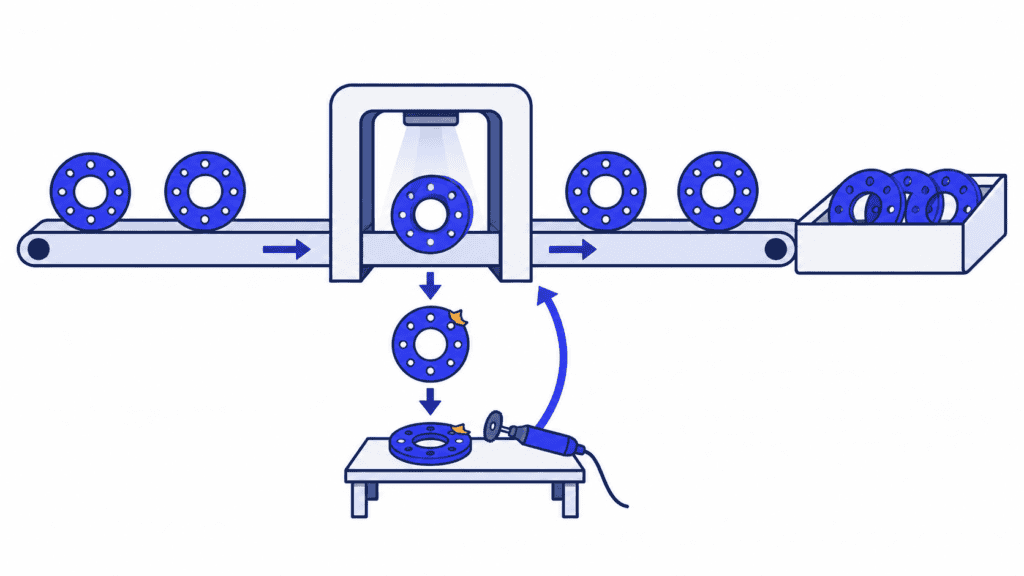
First pass yield (FPY) is the percentage of units that meet the agreed quality requirements on their first attempt through a defined process, without repair, rework or a repeat test after failure. It tells you how much production was right the first time, rather than how much eventually became acceptable.
That distinction matters when the finished quantity looks healthy but the factory is struggling to keep up. Repaired parts may still ship, yet getting them ready has used time that other orders needed. Tracking FPY alongside recovery effort reveals what the good-output total hides. Connecting that work with SkyPlanner’s production records and scheduling helps you see what it means for capacity and deliveries.
How to calculate first pass yield
Use this formula:
First pass yield (%) = Units accepted on the first attempt ÷ Units entering the defined process × 100
Count unique units, not inspection events or individual defects. A part that fails, receives correction and then passes is good final output, but it is not a first-pass success. A part with several defects is still one failed unit for this calculation.
Define the process boundary before collecting the numbers. You might measure a machining operation, a test station or a complete manufacturing route. The numerator and denominator must describe the same group of units at that boundary.
Example: 90% first pass yield, 96% final yield
Imagine a batch of 500 machined parts whose first-attempt inspection results are complete:
| First-attempt result | Parts | What happens next |
|---|---|---|
| Accepted without correction | 450 | Ready for the next operation |
| Sent for rework | 40 | 30 later pass; 10 are eventually scrapped |
| Scrapped immediately | 10 | Cannot proceed |
| Total entering the operation | 500 | Every part has one first-attempt result |
The first pass yield is:
450 ÷ 500 × 100 = 90%
After rework, there are 480 accepted parts: the original 450 plus 30 recovered parts. Final yield for this batch is therefore:
480 ÷ 500 × 100 = 96%
Both percentages are useful. FPY describes first-attempt performance. Final yield describes the proportion eventually accepted, including successful rework. Reporting only 96% hides the correction needed to recover those 30 parts.
Nor is the remaining 10% in the FPY calculation the scrap rate. In this example, 20 parts are ultimately scrapped, so final scrap is 4%. The other 6% of the original batch was recovered through extra work. Subtracting scrap alone would give final yield, not first pass yield.
Get the counting rules right before trusting the percentage
The arithmetic is easy. Preserving the meaning of “first attempt” takes more care, especially when production and inspection records come from different systems.
1. Choose one process and a comparable product group. A first-pass result at machining is not final acceptance of the whole assembly. Keep routes and acceptance requirements clear so a change in product mix does not masquerade as a quality improvement.
2. Match the input group to its results. Start with a batch or another traceable group whose first-attempt outcomes are known. Dividing today’s accepted completions by today’s new starts can mix different parts, particularly when jobs span shifts.
3. Retain the original outcome. Keep first-attempt acceptance separate from later acceptance after correction or repeat testing. Overwriting the failed result when a repaired part passes makes the history look better without changing what happened.
4. Count a unit once at that boundary. Multiple defects, repeated tests and repeated time entries do not create additional original units. Use unit identifiers or a reconciled batch record that preserves quantities and rework history.
5. Make unresolved results visible. Parts still awaiting inspection are not automatically accepted or rejected. Show the unresolved quantity and finalize the cohort’s FPY when its first-attempt results are complete, rather than quietly dropping difficult parts from the count.
An operation can have several planned inspections within its normal route. Completing that agreed sequence correctly the first time is different from repeating a failed test or correcting a defect. State that distinction in the measurement definition and keep it consistent.
If your report contains only total completed and faulty quantities, check what those fields mean before treating them as an FPY calculation. You need to know whether the accepted quantity includes repaired parts and whether repeated processing has been counted more than once.
First pass yield vs. rolled throughput yield
An individual operation can look successful while a full route requires substantial correction. Rolled throughput yield (RTY) shows the combined first-pass performance across successive process steps.
For a consistent sequence, multiply the step yields as decimal fractions:
RTY (%) = First-pass yield at step 1 × First-pass yield at step 2 × … × 100
Imagine following 1,000 parts through three operations. For this example, only parts that remain free of first-pass failures continue in the tracked group; repaired parts do not rejoin it.
| Operation | Parts entering the tracked group | Parts passing first time | Step yield |
|---|---|---|---|
| Machining | 1,000 | 900 | 90% |
| Finishing | 900 | 810 | 90% |
| Testing | 810 | 729 | 90% |
0.90 × 0.90 × 0.90 × 100 = 72.9% RTY
Every operation has a 90% step yield, but only 729 of the original 1,000 parts pass all three without a failure. Averaging the three percentages would give 90% and conceal the cumulative effect.
In real production, repaired parts may rejoin the flow and products may take different routes. Use step yields from a compatible route and counting basis; do not multiply unrelated department averages and call the result an observed end-to-end success rate. Keeping each unit’s first-attempt history lets you check how many original units actually passed the full route without correction.
What is a good first pass yield?
A useful target reflects the product, process, quality requirements and consequences of failure. A general benchmark is not enough to judge whether your particular operation is performing well.
Start with the trend for comparable work. Read the percentage alongside the number of units measured, the failure reasons and the amount of corrective work. A higher FPY is meaningful when the same acceptance rules apply; it is not an improvement if the team has merely relaxed inspection criteria or removed troublesome units from the denominator.
For improvement, look for a repeatable problem you can change. Group first-attempt failures by operation and confirmed cause. A recurring dimensional problem on one product may point you toward the tool, fixture, material or method; the percentage alone cannot tell you which one is responsible. Check the evidence with the people doing the work, correct the cause and measure comparable production again.
Also consider the recovery burden. Two operations with the same FPY can have very different consequences if one needs a quick correction and the other ties up a shared machine for hours. That is where the quality result becomes a planning decision.
Turn the rework behind FPY into a realistic capacity requirement
Return to the 500-part batch. Imagine each of its 40 rework attempts takes an additional 12 minutes on the same machining centre, whether the part ultimately passes or is scrapped.
40 attempts × 12 minutes = 480 minutes = 8 machine hours
The final-yield report shows 480 accepted parts. The production plan also needs to account for those eight extra hours. Additional setup, inspection or handling may require more time elsewhere.
Do not assume that a 10% first-pass failure rate means exactly 10% lost capacity. Corrective routes and durations differ. Calculate the actual work required, on the resources that must perform it. Machine hours and operator hours should also remain distinct when they describe different constraints.
If that machining centre is already committed before an important dispatch, squeezing rework into a separate side queue does not create capacity. It changes which order can finish first. Seeing the conflict early gives you time to choose a priority, use another suitable resource or reconsider a delivery promise before it becomes a last-minute surprise.
Use SkyPlanner to connect recorded rework with the next production plan
SkyPlanner brings production time logging, detailed reports and AI scheduling together. For a factory where rework keeps disrupting deliveries, that is the useful next step: make the recovery effort visible and give approved corrective work a realistic place alongside customer orders.
SkyPlanner’s Timer records work time and produced or faulty quantities. The All Timelogs Report connects recordings with the job, process step, workstation, person, start and end times, completed and faulty pieces, logged time and notes. Records can be reviewed, edited and approved there.
When corrective work is identified in the job and logging records, you can investigate where its recorded time went instead of losing it inside an anonymous daily total. Retain the first-attempt acceptance and rework history from your quality or MES records for the FPY calculation. Those records explain the quality outcome; the associated time records explain the recovery effort.
Then bring the approved corrective operations, their durations and eligible resources into the schedule. SkyPlanner’s scheduling AI, Arcturus, calculates the work around configured capacity, operation dependencies and priorities. The Gantt timeline shows the resulting sequence and completion dates. You steer the priorities and protected decisions; Arcturus handles the connected scheduling calculation.
For the imagined batch, the question becomes concrete: where can eight more machining hours fit, and what happens to the orders already using that resource? Recalculating the shared plan makes that trade-off visible without manually repairing a separate queue for every affected workstation.
SkyPlanner integrates with any ERP or MES through its open REST API. You can keep the systems that hold your orders and quality history while connecting the work they generate with finite production scheduling.
See what your first-pass losses mean for delivery
Choose one operation where the final accepted quantity regularly hides extra work. Bring its first-attempt results, a typical approved corrective route and an affected customer order to a SkyPlanner demo.
You will have a focused starting point for seeing how recorded production and a shared schedule can help your team respond: understand the recovery effort, review the capacity conflict and make the next delivery decision with a plan that includes the work still to do. Book a SkyPlanner demo to explore your process, or try SkyPlanner with demo data first.
Jussi Mäntylä
Production Planning Specialist, SkyPlanner