





In this article
- What is jidoka in manufacturing?
- Jidoka, Andon and poka-yoke do different jobs
- Start with a clear distinction between normal and abnormal
- Make the stop lead to verified recovery, not repeated resets
- Example: a cutting cell that no longer needs a spectator
- Measure good output and freed attention, not just fewer stops
- Put approved recovery work into the production schedule
- What faster replanning looks like in practice
- Build a process that knows when not to continue
Home » Resources » Jidoka in Manufacturing: Build Quality Into the Process
Estimated reading time: 10 minutes
An automatic machine can keep working long after the work has gone wrong. If someone must watch every cycle to catch the first bad part, the machine has automated the operation without removing the need for constant supervision.
Jidoka addresses both problems. The process recognizes an abnormal condition and stops its continuation, so a person can investigate instead of standing beside the machine waiting for something to fail. Quality is built into the work, rather than left entirely to inspection after more value has been added.
For a production manager, the next challenge is organizing what happens after the stop: affected output, approved recovery work and the other orders sharing the same capacity. SkyPlanner APS helps bring those confirmed changes into one production schedule, without rebuilding every machine queue by hand.
What is jidoka in manufacturing?
Jidoka is the principle of giving machines and operators the ability to detect an abnormal condition and stop work before the problem continues through production. It is one of the two pillars of the Toyota Production System, alongside Just-in-Time.
It is often called autonomation, or automation with a human touch. The distinction matters: ordinary automation performs a task; autonomation adds the ability to recognize when the task should not continue normally. People still define acceptable work, solve problems and improve the process.
The idea has roots in Sakichi Toyoda’s loom development. A loom that stopped when a thread broke did more than save defective fabric. It removed the need for someone to watch the machine continuously. That combination of built-in quality and a better division of human and machine work remains the point of jidoka.
Jidoka also applies to manual operations. An operator who recognizes an abnormal condition must be able to stop and obtain support rather than pass questionable work onward. It is not a requirement to automate every task before improving quality at the source.
Jidoka, Andon and poka-yoke do different jobs
These methods can work together, but buying one device does not establish the whole jidoka principle.
| Concept | The job it performs | What that means in practice |
|---|---|---|
| Jidoka | Detect an abnormal condition, stop its continuation and expose the problem for resolution | The process does not silently keep producing when an important condition is wrong |
| Andon | Make the condition visible and call for a response | The right people know where attention is needed and can organize help |
| Poka-yoke | Prevent a specific mistake or detect it at a useful point | A known error is made impossible or apparent before it travels further |
| Final inspection | Assess the finished output against requirements | Nonconforming output can be identified, but work may already have been added to it |
An Andon light is useful when it brings help. It does not, by itself, prove that the process recognizes a defect or prevents another bad unit. A poka-yoke check can support jidoka, but its value depends on what happens when the check fails. A warning that everyone can overlook is different from a process that cannot continue under the wrong condition.
Inspection still has its place. Jidoka is not a reason to remove required inspections; it is a reason to stop relying on them as the first opportunity to discover a recurring production problem. Within lean manufacturing, the aim is less wasteful work and more good output, not merely a faster machine cycle.
Start with a clear distinction between normal and abnormal
Before choosing a sensor or alarm, understand the work. What condition tells the team that the operation is proceeding correctly? At what point could that condition be checked before an error becomes harder to contain?
“Watch for quality problems” gives an operator little to act on. A defined characteristic, required component, completed action or acceptable process condition gives the team something it can recognize and verify.
Start with one recurring failure and follow it through the actual process. Look at the approved method, product variants, setup changes and the point where a defect first becomes detectable. Improve an unstable or unnecessarily complicated method before automating it. Otherwise, the equipment may reproduce the same uncertainty more quickly.
For the selected condition, agree:
- What distinguishes acceptable work from an abnormal condition.
- How and where the condition will be detected.
- What work must stop or be prevented from advancing.
- How potentially affected output will be identified and controlled.
- Who assesses the problem and confirms the conditions for restarting.
Those decisions belong together. Detection without a defined response leaves the process dependent on someone noticing and improvising.
Make the stop lead to verified recovery, not repeated resets
A useful jidoka response has four connected parts: detect the abnormality, stop its continuation, restore an approved operating condition and prevent recurrence.
The immediate response and the longer-term improvement are related but not identical. The team may correct a setup problem and verify acceptable output before completing a deeper investigation. Any temporary containment needs an explicit owner and approved conditions; it should not become an undocumented permission to keep making questionable parts.
Do not treat a reset as evidence of recovery. The responsible people need to establish what happened to the process, what happened to the affected output and what demonstrates that accepted production can resume. Depending on the operation, that may involve checking the setup, verifying a representative result or following a defined quality-release procedure.
Then investigate why the condition occurred and strengthen the process. A recurring stop that produces only another reset is a visible problem, but not yet a lasting improvement. Update the work standard and detection method where the investigation shows they need to change.
A quality-related production stop is not the same thing as an emergency stop or machinery isolation. Equipment handling, safeguarding and restart must follow the applicable approved procedures. Jidoka is a production principle, not a substitute for those arrangements.
Example: a cutting cell that no longer needs a spectator
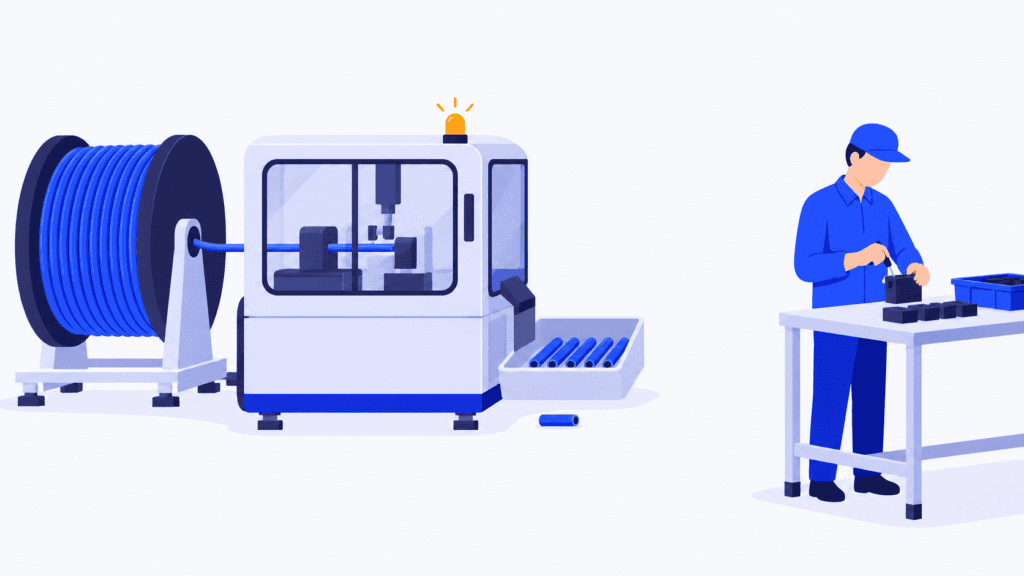
Imagine an automatic cable-cutting cell supplying a downstream assembly area. The machine feeds and cuts the cable, but feed slippage can produce pieces outside the required length. Previously, an operator watched the output and checked pieces while the machine continued running.
The team first defines the accepted length condition and examines where it can be checked reliably. Its approved improvement checks the cut result and stops further feeding when the required condition is not satisfied. The abnormal condition is made visible, and the operator responds. This is an illustration of the operating principle, not a machine-control design.
The important change is not the presence of a measurement display. It is that the process no longer depends on the operator spotting the first wrong piece while more pieces continue to emerge.
When a stop occurs, the team controls the potentially affected output rather than assuming that every earlier piece is good. It establishes which output is accepted, which remains on hold and which must be replaced, using the process’s quality rules and available evidence. The last recorded check may help that decision; it is not automatically proof that everything since then is acceptable.
After the cause is addressed, the responsible team verifies the restart condition. Longer-term corrective work follows if needed. Meanwhile, the operator can carry out other assigned tasks during normal automatic running rather than stare at each cut.
That last benefit requires an organized work cycle. Loading, unloading, replenishment, checking and responding to an abnormality still take time. Moving the operator to another task is useful only if the person can complete the assigned work and respond when needed. Jidoka separates people from continuous machine watching; it does not make human work disappear.
Measure good output and freed attention, not just fewer stops
A machine that never stops can look productive while sending defects downstream. Equally, a new detection method that repeatedly rejects acceptable work can consume the capacity it was meant to protect.
Review the selected failure mode against comparable production. Look at nonconforming output reaching later operations, repeat occurrences, unnecessary stops and the time people still spend watching or recovering the process. Ask whether the detection method works across the approved variants and normal operating conditions, not just on the demonstration part.
During an approved trial, challenge the detection and response with known acceptable and unacceptable conditions. Confirm what happens when the check cannot establish a valid result. Quality and engineering should set the acceptance criteria and control any test items so they cannot enter normal shipments.
Treat an increase in reported abnormalities as information to investigate, not automatic failure. The process may be exposing problems that were already there. The goal is to remove their causes and reduce avoidable work, not encourage people to keep the stop count low by overlooking them.
Put approved recovery work into the production schedule
Return to the cable-cutting cell. A verified stop can leave less accepted output than planned, a period of unavailable capacity and replacement cutting work before assembly can finish. Restoring the machine does not automatically restore the original delivery plan.
The planner needs the current production facts: the best confirmed availability estimate, accepted and remaining quantities, approved additional work, and any changes to operation durations or eligible resources. Held output should not be treated as released material merely to make the schedule look complete.
This is where SkyPlanner APS makes the recovery easier to manage. Record the real capacity change and represent the approved remaining or replacement work in the plan. Arcturus, SkyPlanner’s scheduling AI, calculates the sequence against the configured workstations, shifts, priorities and operation dependencies.
A workstation exception represents a period when the resource is unavailable. The Gantt timeline shows the resulting schedule, so the planner can review the cutting work, its downstream operations and other orders competing for the same capacity. Instead of maintaining a separate recovery list and manually reconciling it with every queue, you work from a shared plan with clearer completion dates.
You decide which commitments take priority and which scheduling decisions need protection through rules and locks. Arcturus handles the calculation within those instructions. An alternative machine helps only if it is eligible for the work and has usable capacity; giving an order higher priority does not replace the hours lost to the stop.
Keep the quality decision and the scheduling decision distinct. A workstation exception records capacity, not permission to restart. A dependency defines the planned sequence, not proof that an inspection passed. The responsible production and quality team establishes the approved continuation; SkyPlanner helps fit that continuation around the rest of the order book.
SkyPlanner integrates with any ERP or MES through its open REST API. Your existing order and production information can therefore connect with scheduling rather than become another separate recovery spreadsheet.
What faster replanning looks like in practice
Food-packaging manufacturer Fredman Operations faced the coordination side of this problem as order volumes grew. Work cards moved manually from its L7 ERP to LTR production management software, and the planner lacked precise visibility into machine release times and shift capacity. Rescheduling urgent work could take an hour or more.
With SkyPlanner, the team uses a shared Gantt view and shift-by-shift capacity in daily planning. Fredman reports faster responses to changes and a reduced need for overtime. Its experience shows why capacity visibility matters when the next delivery promise depends on a changed production plan.
For a quality interruption, the same scheduling benefit matters: the planner can spend more time deciding what the confirmed change means for customers, and less time reconstructing the sequence across separate lists.
Build a process that knows when not to continue
Start with one operation where abnormal work can continue unnoticed. Define what normal looks like, establish how the process will recognize a deviation and make sure the response prevents the problem from travelling further. Then organize recovery and improve the cause, rather than normalize repeated resets.
Choose SkyPlanner APS when those approved recovery decisions leave you manually rearranging the rest of production. It brings changed capacity, remaining work and competing customer orders into one schedule, making the delivery trade-offs visible before you issue a new promise.
Book a SkyPlanner demo with one recent quality interruption, its confirmed capacity impact and the approved work needed to complete the affected order. See how that work fits alongside your other commitments. To explore the scheduling approach first, try SkyPlanner with demo data or use the AI-assisted Getting Started in SkyPlanner Assistant.
Jussi Mäntylä
Production Planning Specialist, SkyPlanner


