





In this article
- What is Andon in manufacturing?
- Build the response behind the signal
- Does pulling an Andon cord stop the line?
- Start with one area and a clear response agreement
- Make the signal easy to interpret
- Physical or digital Andon: choose around the response
- Example: one machine stop, several affected orders
- Use SkyPlanner to recalculate the connected work
- Measure whether help arrives and problems stay resolved
- Turn the next confirmed disruption into one shared plan
Home » Resources » Andon in Manufacturing: Turn Signals Into Action
Estimated reading time: 11 minutes
An operator signals a problem. The light changes, people notice, and the job still waits. Maintenance assumes the supervisor is handling it; the supervisor assumes someone has already called maintenance. Meanwhile, the next department keeps preparing work for a machine that cannot run.
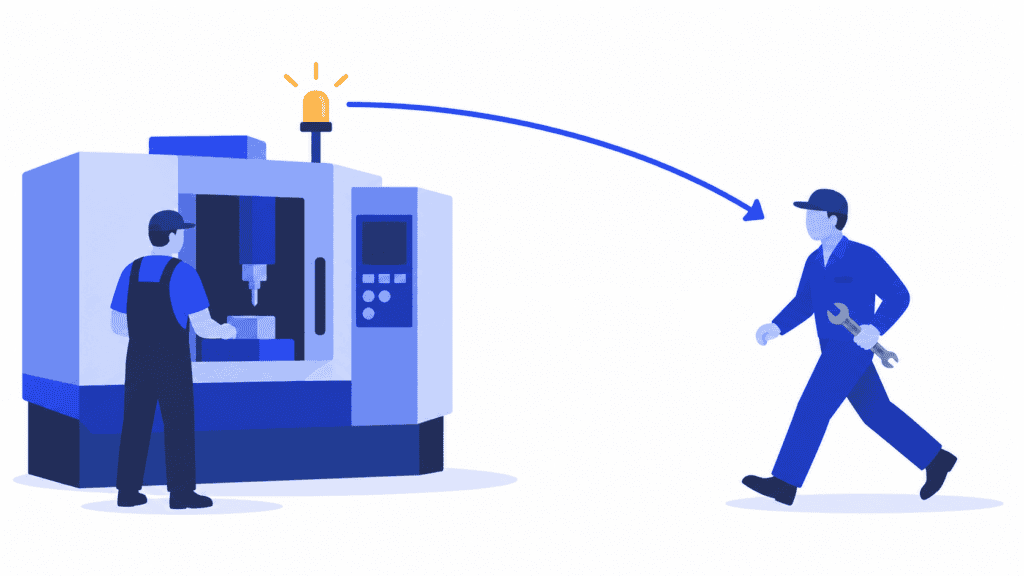
That is the gap a useful Andon system must close. Andon in manufacturing makes abnormal conditions visible and calls attention to the place that needs help. Its value comes from what follows: someone accepts responsibility, brings the right support and confirms when the process is ready again.
For a production manager, there is another consequence to manage. A confirmed interruption can change the sequence of several customer orders, not just the stopped operation. SkyPlanner APS helps you reschedule that connected work around the capacity change, so the factory follows a common plan rather than several improvised urgent lists.
What is Andon in manufacturing?
Andon is a visual management method for showing production status and signaling an abnormality or need for assistance. A cord, button or machine signal can activate a light, board or other notification that identifies where attention is needed. The name comes from a Japanese word for a lantern and is closely associated with the Toyota Production System.
The important information is simple: where is the problem, what help is needed and who is responding? Depending on the process, the signal might concern equipment trouble, a quality concern, a missing component or an operator falling behind the agreed work sequence.
An Andon board can also show planned and actual output. But a display of results is not the whole response system. If an operator must leave the workstation and search for a supervisor after raising the signal, the most important part of the communication is still unresolved.
Two nearby concepts help clarify the purpose:
- Andon versus a production dashboard: a dashboard gives a selected view of production information. Andon directs an immediate response to a particular condition. A screen can serve both purposes, but displaying a warning does not assign the response.
- Andon versus kanban: kanban authorizes or signals production or replenishment in a pull system. Andon signals status or a problem requiring attention. A material shortage can trigger an Andon call without making the two methods interchangeable.
Andon also supports jidoka: recognizing abnormalities and addressing them rather than allowing defective work to continue through the process. The practical starting point is not a more impressive screen. It is an agreement about what happens when someone asks for help.
Build the response behind the signal
A useful Andon process connects the initial observation to a verified result. Make the handoffs explicit enough that they work on a busy shift, not just when the usual supervisor is standing nearby.
| Stage | What the team needs to do | What confirms the handoff |
|---|---|---|
| Signal | Identify the affected station and observed condition through the agreed channel. | The right responder can recognize where help is needed. |
| Accept | A designated responder takes ownership and tells the operator the call has been received. | Someone is accountable; an acknowledgement is not mistaken for a fix. |
| Respond and escalate | Assess the condition, bring the appropriate specialist and follow the agreed production response. | The next action, responsible person and next update are clear. |
| Restore and verify | Confirm the required equipment, process and quality checks before returning to normal operation. | The responsible people confirm readiness, not merely that the light has been reset. |
| Feed back and improve | Tell the team what changed and assign any remaining investigation or corrective work. | The operator knows the outcome and recurring problems have follow-up. |
Give the first response to a role that can actually act. “Everyone on the shift” is an audience, not an owner. A team leader might accept the initial call and coordinate maintenance, quality or material supply; another factory may assign those categories directly. Either arrangement needs a backup when the usual responder is absent or already occupied.
Keep ownership through transfers. If the supervisor requests maintenance, agree who remains responsible for updates to production. Passing on a message should not leave the operator waiting between departments.
Acknowledge quickly, but do not close quickly for the sake of a score. “I have seen it” and “the process is restored” are different events. Keeping them separate prevents a green display from concealing unfinished work.
Does pulling an Andon cord stop the line?
It depends on how the system and production process are designed. An Andon call may request help while work continues under the approved conditions, or it may be associated with a stop. In Toyota’s fixed-position-stop approach, a call brings assistance and an unresolved problem leads to a stop at a defined position. It is not a universal rule that every cord pull immediately stops every machine.
For your own process, distinguish three decisions: requesting help, deciding whether production may continue and authorizing a return to normal operation. Agree the responsible roles and conditions before introducing the signal.
An Andon notification is not, by itself, an emergency-stop or machinery-isolation function. Equipment-specific stop, isolation and restart arrangements must govern the actual response. Do not copy another factory’s cord behavior or response interval as a general safety procedure.
The management lesson is straightforward: employees need confidence that reporting a legitimate concern brings support. If every call leads to blame for lost output, the system encourages silence precisely when early information would help most.
Start with one area and a clear response agreement
Choose a cell or line where delays in getting help are a recurring problem. Walk through a recent event with operators, the shift leader and the functions that had to respond. Find the actual delay: recognizing the condition, locating someone, accepting the call, getting a specialist or deciding what to do with affected work.
Then agree a short operating routine:
1. Define the conditions that warrant a call. Use recognizable observations, not diagnoses the operator cannot yet make. “Repeated abnormal machine stop” is more useful than requiring a confirmed component failure.
2. Keep the initial message short. Identify the station, problem category and immediate production condition. Capture detailed causes later rather than make a waiting operator complete a long report.
3. Name the first responder and backup for each shift. Include breaks, absences and simultaneous calls. Verify that people can recognize and receive the signal where they actually work.
4. Set response and escalation boundaries. Decide what happens if nobody accepts the call, if the issue remains unresolved or if its consequences become more serious. Use the process’s needs and available support, not an arbitrary universal timer.
5. Define closure and the planning handoff. Identify who confirms restoration, who informs the operator and who updates capacity or remaining work when the production plan is affected.
Test the routine with the people who will use it. Include an unanswered call, an occupied responder and a shift change. If success depends on someone remembering a private phone number, the response is not yet dependable.
Make the signal easy to interpret
Use a small set of states that people can distinguish at the working distance. A local convention might separate normal operation, help requested and production stopped. Agree the meaning, display it near the work and train all shifts; color alone should not carry information that people also need in words or symbols.
Do not assume that a red or yellow light means the same thing in every factory. The useful standard is a shared meaning in your process. Adding more colors and sounds is worthwhile only when it helps the responder choose a different action.
Physical or digital Andon: choose around the response
A cord, button and visible light can work well where the responder is nearby and the signal identifies the station clearly. Digital notifications can help when responders move between areas, several support functions are involved or the team needs a reliable event history.
Judge either approach by the same practical questions. Can the operator raise the call easily? Does it reach the right person? Is acceptance visible? Can the team distinguish an open call from a restored process? What happens if the communication channel is unavailable?
For a digital system, examine assignment, escalation, event timestamps and the information needed for follow-up. More notifications are not necessarily better: sending every event to everyone makes it harder to recognize the call that needs immediate attention.
Choose the technology after defining the response agreement. Automating an unclear handoff distributes the uncertainty faster.
Example: one machine stop, several affected orders
Imagine a machine shop where an operator encounters a repeated fault at a machining center and raises the agreed Andon call. The signal identifies the station. The shift leader accepts the call, checks the observed condition and brings maintenance into the response. Equipment handling follows the machine’s approved procedures.
Maintenance confirms that the machine will be unavailable for a repair period. The planner now has a different question from the technician: what should the rest of production do while that capacity is unavailable?
One affected order still needs machining, inspection and packing. Another department is about to start work that would join the queue behind the stopped machine. Moving the first order to a different machine is an option only if that resource is approved for the operation and has usable capacity; it would also displace other scheduled work.
The planner needs the confirmed unavailable period, the affected operation’s actual status and the best current recovery estimate. If that estimate changes, the plan needs another update. A previous average repair time is not a promise that this repair will finish at the same point.
Simply clearing the alert after maintenance arrives would leave all of those production consequences unresolved.
Use SkyPlanner to recalculate the connected work
In SkyPlanner, a workstation exception records a resource’s unavailable period. That removes the time from usable capacity. Arcturus, SkyPlanner’s scheduling AI, can then reschedule affected jobs around the interruption instead of leaving the planner to shift each machine queue by hand.
The calculation uses the configured workstations, shifts, operation dependencies and priorities. The Gantt schedule shows the resulting sequence, so the planner can review the machining operation together with the work that follows it and see which completion dates need attention.
You decide the priorities and protected scheduling choices; Arcturus calculates within those instructions. An urgent order can take precedence, but priority does not create the machine time lost to the breakdown. The value is seeing the trade-off across the shared plan before issuing another delivery promise.
When the responsible team confirms the machine’s return, update the recorded availability and recalculate again as needed. Communicate the current sequence to the people carrying out the work. Technical restoration and a usable production plan are connected, but neither should be assumed from a reset light.
SkyPlanner integrates with any ERP or MES through its open REST API, allowing your existing order and production information to connect with scheduling. For this workflow, the crucial handoff is the confirmed capacity change: it gives the production plan something meaningful to act on.
Measure whether help arrives and problems stay resolved
Review the response process, not just the number of signals. Separate the time until someone accepts the call, the time until effective help begins and the time until the process is verified as restored. Those intervals reveal different problems and should not be compressed into one reassuring average.
Keep a small record of location, observed condition, relevant timestamps, response and follow-up. Where a stop occurs, record its duration consistently. Review repeated calls at the same station or under the same operating conditions; repeated resets can hide a recurring cause.
A short review with operators and responders should produce decisions: which call waited too long, why the backup failed, what needs technical investigation and whether the last corrective action held. Connect recurring equipment losses to the wider maintenance-improvement programme rather than expect the light itself to prevent another failure.
Be careful with targets. Fewer calls may mean fewer problems, but they may also mean people have stopped reporting. Faster acknowledgement is useful only if help follows. A closed event is useful only if readiness was genuinely checked and any remaining corrective work has an owner.
Turn the next confirmed disruption into one shared plan
Start by making the next Andon call dependable: an understandable signal, an accountable responder, a clear escalation route and feedback to the person who raised it. Then close the production-planning gap. The repair team should not have to solve the factory’s job sequence, and the planner should not have to reconstruct it from separate urgent lists.
Choose SkyPlanner when a confirmed interruption leaves you manually rearranging connected orders. Recording the changed capacity and recalculating the shared schedule makes delivery consequences easier to see and reduces the coordination work needed to issue a workable next sequence.
Book a SkyPlanner demo with one recent machine interruption, the affected order and its following operations. See how the unavailable period changes the plan and which delivery decisions need your attention. To explore the scheduling approach first, try SkyPlanner with demo data.
Jussi Mäntylä
Production Planning Specialist, SkyPlanner


