





In this article
- How assemble to order works
- Assemble to order vs. make to order and make to stock
- When is ATO the right production strategy?
- Why ready parts can still become a late delivery
- Plan both sides of the assembly point
- Replenish the modules the product mix actually consumes
- Check usable components for the selected order
- Schedule the whole remaining route
- Replan when readiness or capacity changes
- Use SkyPlanner to connect components with assembly capacity
- Parts readiness and scheduling together at KJH-Comp
- Turn your next assembly order into a workable plan
Home » Resources » Assemble to Order: From Ready Parts to On-Time Assembly
Estimated reading time: 10 minutes
Assemble to order (ATO) means keeping standard components or subassemblies ready, then assembling the finished product after a customer places an order. You prepare the common parts in advance without committing them to every possible finished variant.
That can give customers more choice with a shorter wait than manufacturing everything from the beginning. But a complete set of parts is not a free assembly bench. The order still needs people, equipment and often testing capacity before it can leave the factory.
For a production planner, ATO therefore has two connected jobs: keep the right modules available and give the customer’s chosen combination a realistic place in production. SkyPlanner APS handles that scheduling calculation, helping you turn ready components into a coordinated assembly plan instead of another queue to rearrange by hand.
How assemble to order works
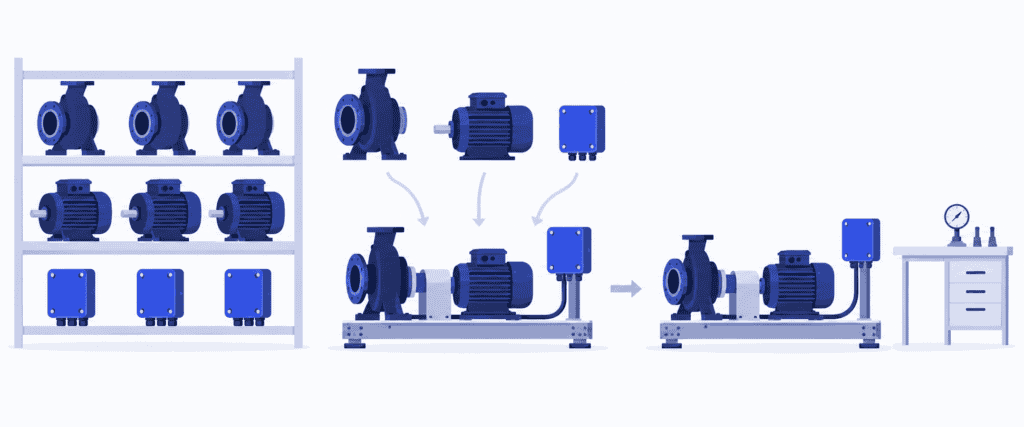
ATO separates work done for anticipated demand from work done for a specific customer. Before the order, you purchase components or manufacture standard modules. After the order, you select the required combination, assemble it, complete any testing or inspection, and prepare it for shipment.
The stock of shared components sits at the customer order decoupling point: the boundary where forecast-driven preparation becomes order-specific work. The important inventory is not a warehouse full of every finished configuration, but a smaller range of components that can serve several configurations.
Imagine a manufacturer supplying modular pump units. Customers choose from approved combinations of pumps, motors and control modules. The manufacturer stocks these components and assembles the selected combination onto a standard base after receiving the order. Final connections, testing and packing remain to be done.
That is ATO. If the same manufacturer first has to engineer an entirely new pumping arrangement, that order is a different proposition. Common parts alone do not make every customized product assemble to order.
Assemble to order vs. make to order and make to stock
The clearest distinction is what is ready when the customer orders.
| Strategy | Ready before the order | Main work after the order |
|---|---|---|
| Make to stock (MTS) | Finished products made for expected demand | Pick, pack and dispatch available stock |
| Assemble to order (ATO) | Standard components or subassemblies | Assemble the chosen combination, test and prepare shipment |
| Make to order (MTO) | An established design and route; some materials may be stocked | Manufacture the ordered product through its required operations |
| Engineer to order (ETO) | Reusable knowledge and possibly standard parts | Engineer the customer-specific solution, then manufacture it |
Configure to order (CTO) describes selecting a product from predefined, compatible options. ATO describes how prepared components become a finished product after the order. The two can overlap: a customer can configure a pump unit that the factory then assembles to order.
These are useful distinctions, not labels you must impose on the entire company. You might stock a fast-selling standard unit, assemble less predictable combinations to order and engineer special applications separately.
When is ATO the right production strategy?
ATO is most attractive when customers want variety, but much of the product can be standardized. The business case depends on whether a manageable component range can cover a valuable range of finished products.
Look for four conditions:
- The options share real components. A motor or control module can serve several finished configurations rather than waiting for one unlikely sale.
- The combinations are already defined. Engineering has established which components work together and how the selected product is assembled and checked.
- The remaining work fits the customer’s delivery window. Assembly, queues, testing and shipment preparation can be completed within the wait the customer accepts.
- Component demand is predictable enough to replenish. You do not need to predict every finished combination perfectly, but you still need a credible supply plan for the parts behind them.
The reward is less commitment to the wrong finished variant. Instead of building a particular pump-and-motor combination and hoping it sells, you keep the choice open until the order arrives. Shared modules can reduce finished-goods inventory investment while letting the customer choose a suitable product.
Preparing the longer-lead work in advance can also shorten the customer’s wait compared with starting those operations after the sale. Standard modules support repeatable purchasing, production and quality checks; the order-specific work is concentrated toward the end.
The trade-off is that inventory risk moves rather than disappears. A superseded control module can still become obsolete. A surge in demand for one motor can hold up several product variants. And a broad catalogue is difficult to deliver quickly if every choice creates a different, lengthy test procedure.
If customers require immediate dispatch, finished stock may be the better choice for the most popular products. If almost every order needs new engineering or unique long-lead parts, ATO offers less of a head start. Choose it for the product families where commonality genuinely removes work from the customer’s waiting time.
Why ready parts can still become a late delivery
Return to the imagined pump-unit manufacturer. The required pump, motor and control module are all available. Assembly has an opening, so the order looks straightforward.
However, the finished unit needs a test station already booked by other orders. Completing assembly early only moves the queue to testing. The customer cannot use an untested unit, so assembly completion is not the delivery date.
Now imagine several customers selecting the option that takes longer to test. The number of orders may be unchanged, but the workload on the test station has increased. A schedule based on one average lead time for every configuration can miss that change.
The useful question is not simply, “Do we have the parts?” It is, “When can this combination pass through all the remaining operations alongside the work already promised?”
That requires a connected view of material readiness, operation sequence and shared capacity. SkyPlanner gives those operations a place in the same production schedule, so the test queue becomes visible while you can still change the plan or discuss a different delivery date.
Plan both sides of the assembly point
A workable ATO process connects component replenishment with customer-order scheduling. Improving only one side leaves the other able to delay the delivery.
Replenish the modules the product mix actually consumes
Plan shared components from their combined demand across the finished variants. Review usable stock, open supply and expected consumption, including firm orders, under your agreed inventory policy. Avoid counting the same customer demand again when it replaces part of the forecast.
Long-lead, frequently used modules deserve particular attention. A cheap missing connector can stop an expensive assembly just as effectively as a missing motor. Review shortages by their effect on complete orders, not only by component value.
If you manufacture modules in-house, give their replenishment work capacity too. A batch of standard bases may compete with customer-specific work for machining or inspection. Replenishment that repeatedly loses its place eventually becomes a shortage at final assembly.
Check usable components for the selected order
Translate the customer’s choices into the correct component quantities and required operations. Check which parts are usable for this order, not just present somewhere in the warehouse. Existing commitments, inspection holds and expected arrivals affect what can actually be used.
Keep expected supply separate from received stock. If a module is still on order, the assembly plan depends on its arrival. A changed supplier date needs to reach the production schedule before the team prepares for work that cannot start. Before releasing the order to assembly, use kitting to collect and verify its parts and make any shortages visible.
Schedule the whole remaining route
Include assembly, any configuration-dependent work, testing, inspection and packing where required. Use the actual processing and setup requirements, eligible workstations, shifts and operator availability. Compare the resulting production finish with the dispatch requirement, allowing time for transport separately.
Do this alongside other orders and relevant replenishment work. Two orders cannot each have exclusive use of the same test station at the same time merely because their component checks both passed.
If the work does not fit, assess a real response: an approved alternative workstation, additional capacity, a changed priority or a later commitment. Review the effect on other customers before treating an urgent order as solved.
Replan when readiness or capacity changes
A late component can cause an order to miss its assembly opening. A different order may then take that opening, so the eventual delivery delay need not equal the supplier delay. The downstream sequence must be recalculated too.
The same applies to a test-station interruption or lost shift capacity. Keeping each queue updated manually consumes planning time and makes it harder to see the consequences across the factory. This is where SkyPlanner’s automatic scheduling becomes especially valuable.
Use SkyPlanner to connect components with assembly capacity
SkyPlanner brings workstations, shifts, operators, materials and priorities into one production plan. You define the product’s process steps, durations and resource requirements. Its scheduling AI, Arcturus, calculates the sequence using the configured capacity, dependencies and rules.
For the pump-unit example, assembly and testing become connected operations rather than separate departmental dates. The Gantt timeline shows where the work runs, what shares its resources and when it is expected to finish. You can see whether ready parts lead to a timely completed unit, not just a busy assembly team.
With material-aware scheduling enabled, Arcturus also considers inventory and incoming materials when calculating start times. Purchase-order delivery dates represent expected availability; confirming delivery updates stock. If the supplier date changes, update that input and recalculate instead of continuing with the old assembly assumption.
For sub-products manufactured as part of an order, SkyPlanner supports production dependencies that schedule their completion before the parent product’s assembly. Stocked components can be linked as materials, bringing their availability into material-aware scheduling alongside the operations still to be done.
You choose the priorities and use locks to protect scheduling decisions. Arcturus handles the calculation within those instructions. When a rush order or capacity change arrives, you spend less time rebuilding workstation queues and more time deciding which delivery commitments to protect.
This also helps you use available capacity more effectively. You can distinguish work waiting for components from work waiting for an assembly or test slot, then address the constraint that actually governs completion. Buying more parts will not remove an overloaded test queue.
SkyPlanner integrates with any ERP or MES through its open REST API. Connect the existing order, product and production data to detailed scheduling while keeping the systems that already manage your business. Better assembly scheduling does not have to start with replacing your ERP.
Parts readiness and scheduling together at KJH-Comp
KJH-Comp, a Finnish sheet-metal contract manufacturer, produces welded structures and fully assembled, tested products. Its C9000 ERP and spreadsheets once showed coarse weekly loads, while day-level machine assignment remained manual. Two supervisors each spent at least half their time on capacity scheduling.
With SkyPlanner, orders still enter the existing ERP, while finite scheduling and machine assignment are automated. In KJH-Comp’s implementation, a pre-welding collection step checks that every required part, including purchased parts, is ready before the job enters the queue. That readiness used to be checked by hand.
The company reports that scheduling responsibility moved from two supervisors to one, with the other reassigned to different work. It also describes earlier visibility of capacity bottlenecks. The relevant lesson for an assembly planner is the combination: parts readiness and a realistic production sequence belong together. KJH-Comp’s SkyPlanner review shows that change in practice.
Turn your next assembly order into a workable plan
ATO earns its place when shared components give customers useful choice without requiring you to stock every finished combination. Protect that advantage by planning the work after the order just as carefully as the stock before it.
Choose SkyPlanner when coordinating component-ready orders, assembly teams and downstream resources has become a daily rescheduling burden. Arcturus calculates the plan; the Gantt view makes its consequences clear; you stay in charge of the priorities.
Book a SkyPlanner demo with one typical assembly order, its component requirements and the resource that most often delays completion. Add another order competing for that resource. Those give us a concrete starting point for showing how SkyPlanner can save replanning time and make delivery dates easier to assess.
Prefer to explore first? Try SkyPlanner with demo data and see how operations and capacity come together in one schedule.
Jussi Mäntylä
Production Planning Specialist, SkyPlanner


