





In this article
- What are you outsourcing: a product or an operation?
- When outsourced manufacturing makes business sense
- Why the return date is not the delivery date
- Keep the outside step in the SkyPlanner production chain
- Plan the handoff as well as the return
- Allow time between completion and the next operation
- Keep actual progress separate from the plan
- When the partner’s date changes, check the whole order
- Bring one outside route into the plan
Home » Resources » Outsourced Manufacturing: Plan Beyond the Return Date
Estimated reading time: 8 minutes
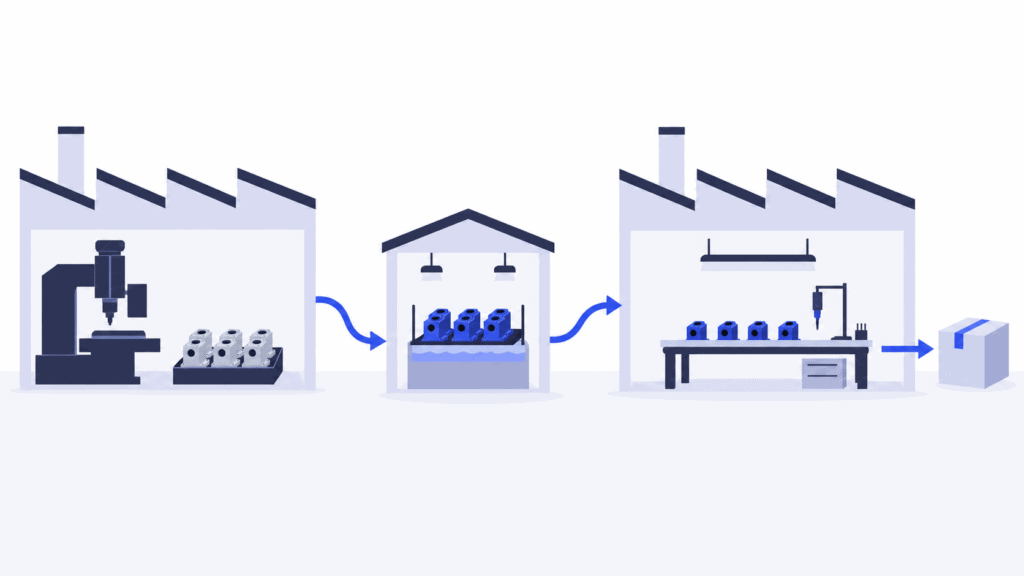
Outsourced manufacturing means hiring another company to carry out production work, whether that is making a complete product or performing a particular operation. A manufacturer might keep machining and assembly in-house while sending parts to a specialist for heat treatment or surface finishing.
The work leaves your factory, but it does not leave your delivery promise. When those parts come back, they may still need another machine, an assembly team and a final inspection before the customer can receive the order.
That is why a supplier’s expected return date is not enough to plan production. You need to connect the outside operation to the work before and after it. SkyPlanner APS does this by including subcontractor workstations in the production chain, giving you one schedule to plan the handoff, see the remaining work and respond when timings change.
What are you outsourcing: a product or an operation?
Outsourcing can mean handing over the manufacture of an entire product. A business provides specifications to a production partner and receives finished goods. Contract manufacturing often describes this arrangement, although the term is also used for making components or providing selected manufacturing services.
For a factory with its own production resources, outsourcing often means something more specific: an external operation within an otherwise internal route. You make the part, a partner treats or finishes it, and your team completes the order.
The scheduling problem is different from simply buying a finished item. Your own work must be ready for the partner’s agreed start, and the returned batch must fit into the remaining internal workload. Treating that outside step as an unrelated purchase can hide both dependencies.
Nor does outsourcing necessarily mean sending work overseas. A nearby specialist can perform an external operation. Distance matters for transport and coordination, but the planning question remains the same: when will the parts be ready for their next step?
When outsourced manufacturing makes business sense
A capable production partner can give you access to a process you do not have, additional capacity when your own resources are full, or expertise that would be expensive to build internally. You can keep investing in the operations that differentiate your business instead of buying equipment for every occasional requirement.
The strongest reason to outsource is not always the lowest unit price. Consider what happens to the completed order:
| Reason to outsource | What to check before committing |
|---|---|
| Access to specialist equipment or skills | Can the partner meet the specification, and what evidence or acceptance checks do you need? |
| Relief for an overloaded internal resource | Does the outside route finish sooner once transport and the remaining operations are included? |
| Avoiding an investment for intermittent work | Do the service cost, coordination effort and work-in-progress make sense compared with keeping the capability in-house? |
| Handling a temporary rise in demand | What capacity and turnaround has the partner actually agreed to provide? |
A lower processing price can be outweighed by extra handling, freight, rework or a batch waiting for its next internal slot. Conversely, a specialist with a higher quoted rate may help you complete the order sooner and keep your own scarce capacity available for other work.
Make the decision on the whole route, not on the outside operation in isolation. A connected schedule gives you a better basis for that comparison.
Why the return date is not the delivery date
Imagine you manufacture instrument housings. Your team machines the housings, sends them out for anodizing, then fits the internal components and performs a final inspection before dispatch.
The route is straightforward:
Machining → external anodizing → return to your factory → assembly → inspection → dispatch.
The anodizer expects to finish on Thursday. That sounds compatible with the customer commitment, until you ask what Thursday means. Are the housings ready for collection, back at your factory, or available for assembly after receiving checks?
Even when they are physically back, assembly may already be busy with another order. Moving that work could rescue this delivery but put a different customer’s order at risk. Leaving it in place may push completion beyond the date sales has promised.
A separate note saying “back Thursday” does not answer any of those questions. The useful answer combines the outside timing with the internal capacity still required. That is the difference between tracking where a batch is and planning when the order can finish.
Keep the outside step in the SkyPlanner production chain
In SkyPlanner, you can represent the external processor as a workstation with subcontract mode enabled. The outside operation then belongs to the same production chain as the internal work, rather than living only in a separate supplier list.
You define the order’s process steps and their sequence, maintain the job durations, and assign the outside work to the subcontractor workstation. SkyPlanner’s scheduling engine, Arcturus, calculates the schedule under your rules and priorities. The Gantt makes the planned work visible across the resources involved.
For the instrument housings, that means the anodizing step sits between machining and assembly. You can review the planned external interval alongside the work that must finish before it and the work that follows it. You spend less time reconciling separate dates and rebuilding the internal queues by hand.
Plan the handoff as well as the return
An agreed outside start is useful only if your preceding operations can finish in time. SkyPlanner’s Track subcontract start and end times Global Rule checks the job’s start eligibility and schedules or reschedules earlier jobs for that order item to finish in time for the subcontract operation’s start.
This brings the outbound commitment into the planning calculation. It helps you see whether the work leading up to the partner’s slot fits, rather than concentrating only on when the batch is expected back.
Allow time between completion and the next operation
Processing time and waiting between operations are not the same thing. A completed operation may still need a handling, transfer or drying allowance before the next step can begin.
SkyPlanner’s Teardown time can hold back the next process step for the specified interval. The workstation that finished the job can still handle other orders during that wait. You can therefore represent a necessary gap without treating it as productive processing time or tying up that resource unnecessarily.
Decide which interval your outside-operation timing already includes, so you do not count the same allowance twice. A planned transfer allowance helps the schedule reflect the route; it is not a substitute for confirming that the parts have arrived.
Keep actual progress separate from the plan
Subcontract jobs still need to be started and stopped in the timer. The Global Rule governs scheduling; it does not replace those actual start and finish records.
Keep those events aligned with your agreed sent-and-returned workflow. That gives the planner a useful distinction between when outside work was planned and what has actually happened, rather than allowing an expected return to stand in for confirmed progress.
When the partner’s date changes, check the whole order
A revised return date should trigger a production decision, not just an edit to a supplier note. Update the relevant timing information in SkyPlanner and let Arcturus recalculate schedulable work around the changed situation. Then review the downstream operations and the resulting completion timing in the Gantt.
The next action depends on what the schedule shows:
- The remaining work still fits. Keep the commitment and use the updated sequence, without rearranging unrelated jobs unnecessarily.
- The next internal resource has become the constraint. Review priorities and available capacity before paying the supplier to expedite work that would only wait at your factory.
- The order no longer fits before delivery. Decide whether an earlier outside return, a justified internal priority change or a revised customer date is the best response.
You retain the commercial judgment. SkyPlanner handles the scheduling calculation that makes the consequences easier to assess. The benefit is less manual coordination and a clearer answer while there is still time to act.
Bring one outside route into the plan
Start with a recurring order that passes through an external processor. Agree what “sent,” “finished” and “returned” mean, identify who records each event, and confirm the timing needed before the next internal operation can start. Then include the remaining assembly, testing or inspection work instead of stopping the plan at the supplier’s return.
You do not need to replace your ERP to connect that production route. SkyPlanner integrates with any ERP or MES through its open REST API, so you can connect existing order and production data with the scheduling calculation. Purchasing and commercial records can remain part of your existing workflow while production gets a connected plan.
For a SkyPlanner demo, bring an order that goes outside and a recent change to its return date. Ask to see the external operation in the same route as your own work, then examine what the change does to the next internal slot and the final completion date. That is a practical way to see how much coordination you can take out of your day. If you prefer to explore first, try SkyPlanner with demo data.
Jussi Mäntylä
Production Planning Specialist, SkyPlanner


