





In this article
- Push vs pull at a glance
- How push manufacturing works
- How pull manufacturing works
- Three distinctions that prevent the wrong choice
- Push and pull are not synonyms for MTS and MTO
- Pull does not mean zero inventory
- Backward scheduling is not the same as pull
- A hybrid example: common parts, specific customer needs
- How to choose the right production signal
- Make your chosen approach workable with SkyPlanner
- Better execution without changing the whole philosophy
- Test the signal and the schedule together
Home » Resources » Push vs Pull Manufacturing: Choose the Right Signal
Estimated reading time: 9 minutes
The difference between push and pull manufacturing is what authorizes production. Push releases work according to a production plan. Pull authorizes work in response to a downstream need, such as parts withdrawn by assembly. A hybrid uses different signals at different points in the flow.
That distinction matters more than whether your factory calls itself make-to-stock or make-to-order. A stock item can be replenished by pull, while a customer-specific order can still be pushed through departments on centrally planned dates.
The practical question is: what should tell this operation to start, and can the rest of production support it? SkyPlanner APS helps with the second part, turning the resulting orders into a shared schedule based on materials, capacity and priorities. You spend less time reconciling separate machine queues and get a clearer view of the delivery consequences when something changes.
Push vs pull at a glance
| Decision | Push manufacturing | Pull manufacturing |
|---|---|---|
| What authorizes work? | A planned release, often calculated from forecast or firm demand | A downstream request or replenishment signal |
| What guides the quantity? | The planned requirement and batch decision | The signaled requirement and agreed replenishment rule |
| How is inventory handled? | Stock and releases are planned ahead; excess can build if the plan outpaces consumption | Inventory can exist, but replenishment follows demand within defined controls |
| Where can it fit? | Work that needs advance preparation, planned campaigns or long lead times | Flows with clear demand signals and a replenishment response that can keep up |
| What is the main risk? | Producing too early or sending more work downstream than it can use | A missed signal or slow replenishment leaving the next operation short |
Neither approach creates capacity. A pull signal tells you that work is needed; it does not give a shared machine another shift. A push plan gives you dates; it does not make missing material available.
How push manufacturing works
In push manufacturing, a plan determines when work is released. The plan might use a sales forecast, confirmed orders, a master production schedule or material requirements calculated through MRP. Departments receive planned quantities and dates, then pass work to the next operation.
Advance planning is valuable when purchasing or production takes longer than customers are willing to wait. It also helps organize campaigns around costly changeovers. You can prepare common items before the exact final demand is known, rather than trying to fit every activity into the customer’s delivery window.
The danger is treating a planned release as a reason to produce regardless of what happens downstream. If machining keeps feeding an assembly area that has stopped, the extra output becomes a queue, not a completed delivery. Forecast error can also leave you with the wrong mix of stock.
Push therefore needs more than a calendar of starts. It needs realistic quantities, visibility of downstream capacity and a way to revise the sequence when conditions change. Keeping every machine busy is not the same as completing the work customers need.
How pull manufacturing works
In pull manufacturing, the next process tells the preceding process what it needs. For repeat parts, that often means replenishing a controlled stock point, sometimes called a supermarket. Assembly withdraws parts; a card, empty container or electronic signal authorizes their replacement.
The important change is the authorization rule. An upstream operation does not keep making extra stock just because it has spare time. Production follows the agreed demand signal.
This can reduce overproduction, unnecessary handling and money tied up in inventory. It also makes a slow or unreliable process harder to hide behind large piles of material. But the buffer and replenishment response must be designed together. If parts take longer to replace than the available stock can cover, the next operation will run short.
Pull does not mean abandoning planning. You still need to plan capacity, supplier coverage, quantities and the response to demand peaks. Long setups, unreliable processes or many rarely used variants can make a simple stock-replenishment loop difficult to run. Those conditions are reasons to choose the right kind of control, not to apply the same rule to every part.
Three distinctions that prevent the wrong choice
Push and pull are not synonyms for MTS and MTO
Make-to-stock (MTS) and make-to-order (MTO) describe how production relates to customer orders. Push and pull describe how work is authorized along the flow.
A make-to-stock part can use pull replenishment: a withdrawal from finished stock triggers replacement. Conversely, a make-to-order factory may release every operation against a central schedule, pushing work into the next department even when that department is already full.
Receiving a customer order establishes demand. To understand control inside the factory, also ask what authorizes each subsequent handoff.
Pull does not mean zero inventory
A supermarket pull system deliberately holds stock. The aim is to make inventory serve a defined purpose and replace what is used, rather than accumulate output without a downstream need.
Raw materials, replenishment stock and unfinished work still need sensible control. Removing a buffer before replenishment is dependable can replace an inventory problem with a delivery problem.
Backward scheduling is not the same as pull
Backward scheduling works back from a required completion date to determine when operations should take place. Pull determines what authorizes production. They answer different questions.
A job can be scheduled close to delivery yet still be released from a central plan. Equally, a pull replenishment job needs a place in the schedule after its signal arrives. Choosing the start signal and choosing the timing are related decisions, not interchangeable ones.
A hybrid example: common parts, specific customer needs
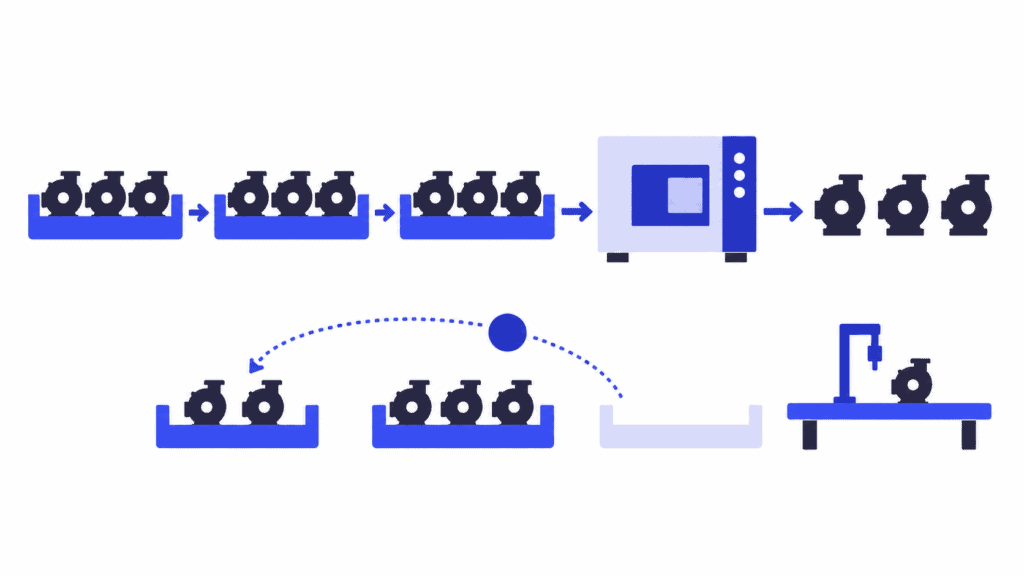
Imagine a manufacturer making a family of industrial pumps. Several models share a machined housing, but seals and final configurations vary.
The company plans housing production in advance because machining and its shared equipment require preparation. Those housings are pushed according to an agreed production plan. At assembly, commonly used seal kits sit in a controlled replenishment area. Withdrawing a container generates the signal to replace that quantity: that loop is pull, even though it holds stock.
Customer orders determine the final pump configuration. The team can prepare common housings without guessing every finished variant, while configuring the final product for a real requirement. It should still define how assembly work is authorized and sequenced, rather than assume that an order alone controls every handoff.
The boundary needs to be clear: which housing quantities come from the plan, which kit quantities come from withdrawal signals, and who handles an exception? A hybrid is useful when each signal has a defined job. It becomes confusing when a planner’s release and a replenishment signal both create replacement work for the same need.
Now suppose a housing batch and an urgent replenishment job need the same resource. Both may be authorized, but they cannot both occupy it at once. That is where the control choice becomes a scheduling problem.
How to choose the right production signal
Start with one product family and follow its route. A factory-wide label is less useful than a clear rule at each important handoff.
1. Identify the need being served. Is this operation preparing common items ahead of demand, replacing consumed stock or fulfilling a specific order? Record the event that actually authorizes it.
2. Compare replenishment time with the time available. Include queues, setups, processing and supply delays. If customers cannot wait for the whole route, decide which common materials or parts should be ready earlier.
3. Check whether the signal is dependable. A pull loop needs a visible request, an agreed quantity and a responsible owner. Plan-driven work needs current requirements and release dates. Prevent duplicate authorization.
4. Test the work against shared capacity. Include the other families using the same machines and people. A local replenishment rule must coexist with the factory’s delivery priorities.
5. Review what happens when reality changes. A late material delivery, broken machine or demand spike should lead to a clear decision, not an unofficial second queue.
Choose push where advance preparation is justified, pull where downstream need can reliably govern replenishment, and a hybrid where different stages face different conditions. Then keep the authorized work and the executable schedule aligned.
Make your chosen approach workable with SkyPlanner
SkyPlanner brings the resulting production orders, operation routes, workstations, shifts and priorities into one scheduling environment. Arcturus, its scheduling AI, calculates the sequence against the defined resource capacity and operation dependencies. Material-aware scheduling brings material availability into that calculation, so a missing component affects the plan rather than becoming a surprise at the machine.
The Gantt schedule shows where work is assigned and how it fits together. Instead of repeatedly correcting department lists, you can focus on which commitment should take priority and see the resulting schedule across the route.
Timing can also vary by order. SkyPlanner supports both ASAP scheduling and JIT scheduling close to an order’s delivery date, including a hybrid of the two. You can give work that needs an early start different timing from an order that should finish nearer dispatch. This helps avoid unnecessary early production while keeping advance preparation where it is useful.
The distinction remains practical: your release or replenishment rule establishes the need for work; SkyPlanner schedules the resulting orders. Its JIT timing is not a substitute for defining the downstream signal.
When priorities, capacity or material conditions change, Arcturus can recalculate the schedule within your rules and locks. That gives you a maintainable plan instead of another round of manually moving work between queues. SkyPlanner integrates with any ERP or MES through its open REST API, connecting existing order and production data with that scheduling calculation.
Better execution without changing the whole philosophy
Eskomatic, a Finnish contract machining company, illustrates the value of improving scheduling itself. Its older system left work queues largely manual, and limited material visibility made shortages harder to anticipate.
With SkyPlanner, the team gained a visual Gantt work queue, automatic load scheduling and clearer material-shortage visibility. Eskomatic reports more accurate delivery-date setting and fewer production stoppages caused by missing material. The fundamentals of its planning stayed the same; daily execution became clearer and more controlled.
That is a useful reason to choose SkyPlanner whether you retain plan-driven releases or introduce pull at selected points: the authorized work still needs a reliable place in the production schedule.
Test the signal and the schedule together
Choose a product family, identify what should authorize its work and bring a recent exception into the discussion. A useful SkyPlanner demo can follow those resulting orders through their material requirements, shared resources and delivery dates, including what changes when one priority or resource changes.
Book a SkyPlanner demo to see how that would work in your factory. If you prefer to explore first, try SkyPlanner with demo data. The goal is not a purer push or pull label. It is less unnecessary early work, less manual queue maintenance and a clearer route to the deliveries you have promised.
Jussi Mäntylä
Production Planning Specialist, SkyPlanner


