





In this article
- What is CONWIP in manufacturing?
- Follow one authorization around the loop
- Choose a boundary and counting unit that mean something
- One batch is not a fixed amount of capacity
- CONWIP, Kanban and drum buffer rope control different things
- A returned token leaves a planning decision
- Use SkyPlanner to connect the release choice with the whole route
- What better readiness visibility changed at Eskomatic
- Set the initial limit, then learn from the flow
- Make the next start earn its place
Home » Resources » CONWIP in Manufacturing: Control What Starts Next
Estimated reading time: 10 minutes
The first machine is free, so another order starts. Downstream, finishing already has a queue. By the afternoon, more parts are waiting, more material is committed, and the orders due to leave have barely moved.
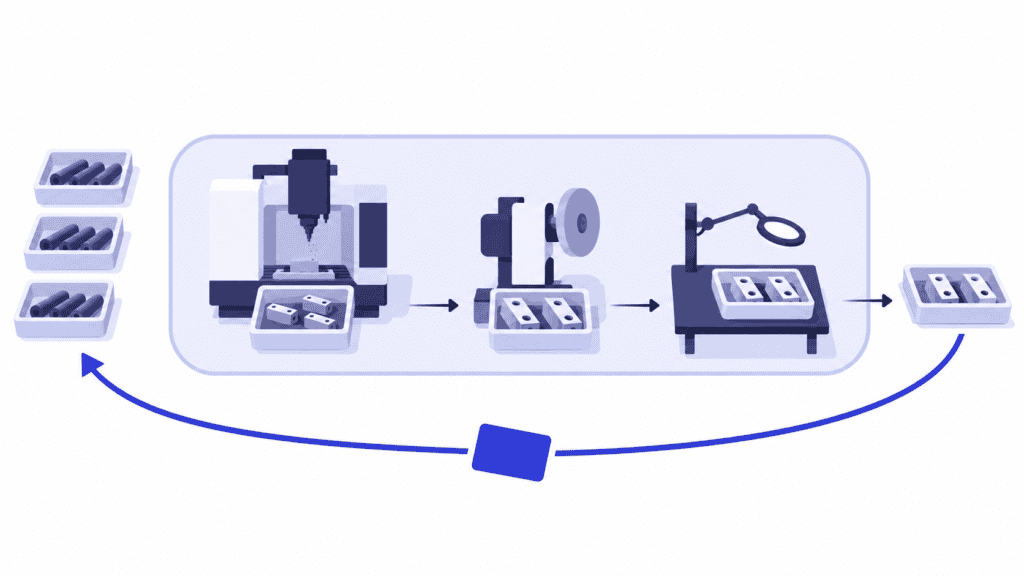
CONWIP gives you a way to stop feeding that problem. It limits how much work can enter a defined production flow: when an authorized batch leaves the loop, its production permission becomes available for another batch. Work waits outside until there is room.
That discipline makes unnecessary early starts harder. It does not decide which waiting order deserves the next permission or make its route fit through busy resources. Use CONWIP to control entry and SkyPlanner APS to maintain the connected production schedule behind that choice. You get less unfinished work competing for attention and less manual effort reconciling machine queues.
What is CONWIP in manufacturing?
CONWIP stands for Constant Work in Process, also commonly called Constant Work in Progress. It is a pull-based production-control method that limits the total authorized work inside a defined loop rather than giving every workstation its own replenishment signal.
A limited set of cards or electronic tokens carries permission to enter. Each token represents an agreed quantity of work, such as one defined production batch. It stays assigned while that batch moves through the loop and becomes available again at the agreed exit event.
Unlike a part-specific replenishment card, a CONWIP token can authorize different products on successive circuits. A prioritized backlog supplies the answer to “what should we make?” The available token answers “is another release allowed?”
“Constant” describes the controlled authorization limit, not a requirement to keep production permanently full. Actual work can be below the ceiling when demand is lower or nothing is ready to start. Releasing an unsuitable order just to occupy a token defeats the purpose.
Follow one authorization around the loop
The operating rule is simple enough to explain at the start of a shift:
1. Keep waiting work outside the loop. Maintain a backlog of orders or batches that have not been released. An order can be visible in planning without being physically started.
2. Match an available token to ready work. The release owner selects the next suitable backlog item using the agreed priorities and readiness checks.
3. Keep that authorization with the work. Processing, transfers and waiting inside the boundary all consume the same permission. Moving from machining to finishing does not free it.
4. Return the token at the defined exit. Confirm that the batch has met the exit condition, reconcile its status and make the permission available again.
If every token is assigned, another batch must wait. An idle first operation is not a reason to create an extra authorization.
Make the exit precise. For example, a loop ending at final acceptance returns its token after acceptance. A loop that includes finished stock may return it only when the product is withdrawn for downstream use. Those designs control different quantities. “Manufacturing finished” and “product left the loop” are not interchangeable events.
Choose a boundary and counting unit that mean something
CONWIP is worth considering when changing products can share a recognizable flow, yet maintaining a separate replenishment loop for every product would be cumbersome. Make-to-order work can suit this logic: the next token can serve a different customer-specific product rather than refill stock of the previous one.
Start with a product family or production area whose entry and exit people can observe. The boundary should capture the queues you want to control, not stop just before the difficult operation. If machining returns every token before parts enter an overloaded finishing area, the loop has not limited the unfinished work accumulating there.
Mixed routes need closer attention. If batches skip operations, leave for subcontracting or join an assembly, define what happens to their authorizations. A single factory-wide counter is not automatically a useful design for unrelated routes with very different completion points. Pilot a coherent flow before extending the boundary.
One batch is not a fixed amount of capacity
Write down what a token represents. If it means one batch, define the permitted batch quantity or range and how splitting a batch is handled. Otherwise, the same card count can conceal much more work simply because batches have grown.
Even with a consistent rule, different products can require different processing hours. A short machining batch and a batch needing lengthy specialist finishing may each occupy one token, but they do not impose equal load. Track remaining workload on shared resources alongside the token count, especially when the product mix changes.
A total-WIP limit also does not set a maximum queue at each station. Work can concentrate before a heavily loaded operation while another station runs short. Keep physical space and safety limits explicit, and investigate persistent accumulation instead of assuming the loop will balance every resource for you.
CONWIP, Kanban and drum buffer rope control different things
The methods can coexist, but their signals answer different questions:
| Method | Main control logic | Useful distinction |
|---|---|---|
| CONWIP | Limit authorized work within a defined overall loop; assign returned permission to selected backlog work. | The next product can differ from the one that just left. |
| Part-specific manufacturing Kanban | Replenish a defined part and quantity after its consumption signal. | The signal identifies what needs replacing. |
| Drum buffer rope | Time release around the constraint’s schedule and the protection needed to reach it. | The constraint’s needs govern the release timing. |
Choose the method around the flow you need to control. Repeat components consumed from stock may suit part-specific Kanban. A family of changing customer orders may benefit from CONWIP’s reusable permission. A flow governed by a clear constraint may call for drum buffer rope.
None of these signals creates capacity. You still need a workable sequence for the operations that authorized work must pass through.
A returned token leaves a planning decision
Imagine a machining shop with a CONWIP loop running from machining entry through final inspection. A batch passes inspection and leaves. Its token is now available, and two ready customer batches are waiting outside.
One needs a short machining operation followed by a long polishing operation. The other needs more machining but no polishing. The polishing station already has a heavy queue; machining has room today.
Both batches fit the token rule. They do not fit the remaining production load in the same way.
Releasing the polishing-heavy batch because its first operation is short may add to the queue that is already delaying deliveries. Choosing the other batch could use available capacity more effectively, but not if doing so sacrifices a more important customer commitment. The planner needs the remaining routes, due dates and competing work together—not just the first free machine or the smallest batch.
This is the distinction that makes CONWIP useful rather than merely restrictive. The token provides permission to enter. Readiness establishes that the work can proceed. A connected schedule shows where its operations fit and what its completion means for other commitments.
Use SkyPlanner to connect the release choice with the whole route
SkyPlanner APS handles that scheduling calculation across your order book. You define process steps, durations, eligible workstations, shifts and priorities. Arcturus, SkyPlanner’s scheduling AI, places operations against the configured capacity and dependencies. With material-aware scheduling enabled, material availability also affects the plan.
For the imagined shop, that means reviewing the waiting batch’s machining and polishing operations alongside work already committed to those resources. The Gantt schedule shows the connected sequence and expected completion. When priorities or capacity change, Arcturus can recalculate the plan instead of leaving you to repair each machine queue separately.
You steer the priorities; the AI handles the linked assignments. That saves planning effort and makes the delivery consequences of a release choice easier to see. A newly available token becomes a reason to review the next suitable order, not an instruction to start whatever is closest to the machine.
SkyPlanner’s start eligibility date can also hold an order item back from being scheduled before an agreed date. It is a scheduling boundary, not the circulating CONWIP token or the physical act of releasing a batch. In your implementation, make the handoff clear: who authorizes release, where the token is recorded, and how that decision reaches the production plan.
SkyPlanner integrates with any ERP or MES through its open REST API. Keep the order and execution systems that serve you well, and connect their information with a common finite schedule. The benefit is a more manageable decision about what should run next, without maintaining a separate version of the plan for every department.
What better readiness visibility changed at Eskomatic
Eskomatic, a contract machining company, previously organized work queues largely by hand. Limited visibility into materials made it harder to anticipate shortages before a planned start.
With SkyPlanner connected to its existing ERP, the company gained a visual Gantt work queue, automated load scheduling and clearer material visibility. Eskomatic reports more accurate delivery-date setting and fewer production stoppages caused by missing materials.
For a shop controlling what enters production, that is a valuable companion to release discipline: fewer avoidable interruptions and a clearer basis for promising completion.
Set the initial limit, then learn from the flow
There is no universal card count that makes every CONWIP loop efficient. The required work in the system depends on the route, operating capacity, variability, batch policy and mix. A ceiling that works for short repeat batches may behave differently when lengthy custom jobs arrive.
Begin with the actual flow. Measure current work inside the proposed boundary, batch sizes, release-to-exit times, completed output and delivery performance. Find out whether a starved resource is missing ready work or whether an overloaded station is simply receiving more than it can finish. Use those observations to choose a starting limit with the people operating the loop.
During the pilot, watch three things together:
- Flow: completed work and release-to-exit time, not just the number of starts.
- Load: where work waits, its age and the remaining hours competing for critical resources.
- Service: whether the required orders finish on time, including any urgent interventions needed to achieve that.
If queues remain excessive, test a controlled reduction in authorizations while watching output and delivery. If output falls, investigate whether the limit is starving an important resource, materials are missing or the sequence is unsuitable. Adding tokens to every difficulty can conceal the cause while restoring the original excess WIP.
Do not return a token just because a batch is waiting for rework or on a quality hold inside the loop. Define how scrap, partial completion and split batches are reconciled. An urgent order must use valid authorization or an explicitly approved, recorded exception—not an invisible extra card. Assign responsibility for lost tokens and reconcile the count before replacing one.
Make the next start earn its place
A useful CONWIP pilot has a visible boundary, a meaningful counting unit, a clear return event and someone accountable for choosing ready backlog work. Its success is not a permanently full loop. It is less unnecessary work on the floor while the right orders keep reaching completion.
Choose SkyPlanner when maintaining the route-and-capacity plan behind those decisions is consuming your planners’ day. The release policy keeps entry disciplined; SkyPlanner makes the shared schedule easier to maintain as the mix and priorities change.
Book a SkyPlanner demo with one waiting order, its remaining route, the work already inside your proposed loop and your release rule. Use that situation to examine what should start next and what it means for delivery. If you want to explore the scheduling view first, try SkyPlanner with demo data.
Jussi Mäntylä
Production Planning Specialist, SkyPlanner


