








In this article
- What is resource allocation in manufacturing?
- An allocation example: protect the machine only one job can use
- How to allocate resources when orders compete
- Establish where the work can actually run
- Check readiness before reserving scarce time
- Allocate the shared tool, not just the machine
- Decide which commitment gets priority
- Review the effect beyond the reassigned job
- Recalculate when the situation changes
- What changed for KJH-Comp
- Give competing orders one connected plan
Home » Resources » Resource Allocation in Manufacturing: Resolve Job Conflicts
Estimated reading time: 8 minutes
The next job is ready, the machine is free, and starting it seems like the obvious decision. But an urgent order also needs that machine and cannot run anywhere else, while the work you are about to start has another option.
This is the daily challenge of resource allocation in manufacturing: deciding which work gets which resources, without making another order harder to deliver. A good decision considers more than the next machine queue. It connects equipment, staffed time, material readiness and the operations still needed to finish the order.
SkyPlanner handles that connected scheduling calculation. You define where work can run and which priorities matter; its scheduling AI, Arcturus, calculates the assignments and timing. Instead of repeatedly moving jobs between separate queues, you can focus on the production decisions behind the plan.
What is resource allocation in manufacturing?
Resource allocation in manufacturing means assigning available production resources to the jobs that need them. In practice, that means choosing a suitable workstation and a workable time, with the necessary people, materials and preceding operations ready.
Resource allocation optimization improves those choices across competing work. The aim is not simply to keep every machine busy. It is to use the resources you have in a way that supports delivery commitments and keeps orders progressing through production.
The distinction matters when one job has several possible machines and another has only one. Giving the flexible job first access to the scarce machine may look efficient locally but create a delay elsewhere.
Capacity planning asks whether you have enough usable capacity for the workload. Allocation decides which work gets that capacity. Production scheduling connects those assignments into a sequence with start and finish times. Utilization then tells you how much of the available resource time was used; it does not, by itself, tell you whether the right work received it.
An allocation example: protect the machine only one job can use
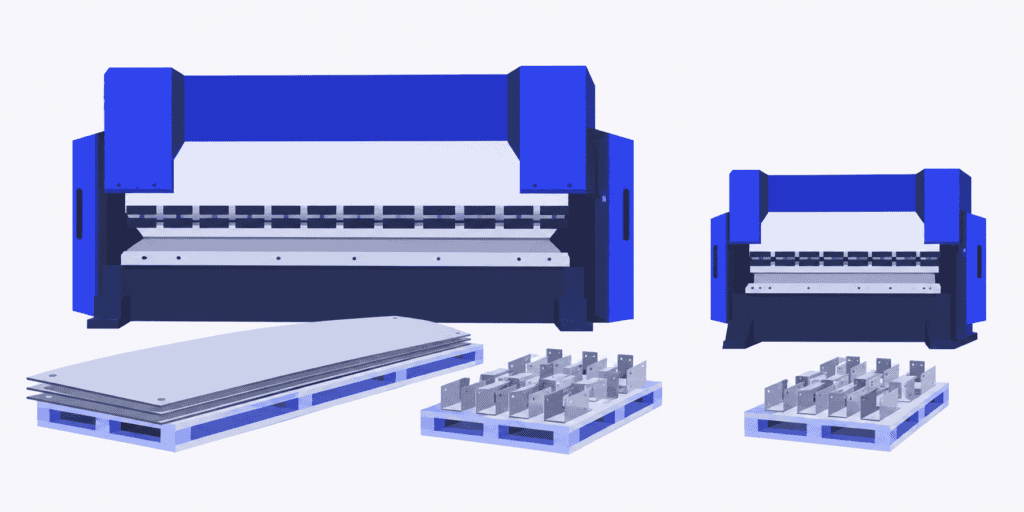
Imagine a sheet-metal shop with a large press brake and a smaller one. Both are staffed and available. A batch of small brackets is ready, and the planner assigns it to the large press because that machine has just finished its previous job.
An urgent panel order also needs bending. Its parts are too wide for the smaller press, so it must wait for the large one. Meanwhile, the smaller press has room for the brackets.
| Work waiting for bending | Eligible machines | What the allocation needs to protect |
|---|---|---|
| Small brackets | Large or small press | A workable route to the order’s later operations |
| Wide panels | Large press only | Access to the only eligible machine before the required handoff |
If the work has not started, assigning the brackets to the smaller press can leave the large press available for the panels. The shop has not bought extra capacity. It has used the existing alternatives more intelligently.
That is a useful option, not a universal instruction to move every flexible job. The smaller press may take longer, require another setup or be needed for a different commitment. If both presses depend on the same operator, their machine calendars alone do not prove that both jobs can run together. The panel order’s next operation must also have room when bending finishes.
The right allocation is the one that works for the connected orders, not just the workstation you are looking at.
How to allocate resources when orders compete
A practical allocation decision starts with what is possible, then considers what matters most. SkyPlanner brings those two questions into the same production schedule, so a change in one queue does not leave you repairing all the others by hand.
Establish where the work can actually run
Start with eligible workstations, not every machine that has an opening. Part size, process capability, tooling and quality requirements determine whether an alternative is real. Include the setup and processing time that alternative needs; two machines that can make the same part may not make it at the same speed.
SkyPlanner lets you define suitable workstations for a job. With alternative-workstation movement enabled, Arcturus can choose among them in the scheduling calculation, taking workstation efficiency ratings into account. This gives flexible work somewhere else to go when a more constrained job needs the shared resource.
The planner supplies the manufacturing knowledge. SkyPlanner applies it across the workload, rather than making you choose every machine assignment yourself.
Check readiness before reserving scarce time
A machine opening is not useful to an operation that cannot start. Check material availability, the preceding process step and the staffing needed for the work. Otherwise, a supposedly urgent job may occupy a place in the plan while ready work waits behind it.
SkyPlanner represents workstations, shifts and operators in the production plan. Material-aware scheduling brings recorded inventory and incoming materials into Arcturus’s calculation when enabled. Configured process-step dependencies connect the work, so the plan can account for what must happen before the next operation begins.
This makes the allocation more useful on the shop floor: the queue reflects the resources and readiness behind the work, not only its requested date. Keep those inputs current when a delivery slips or staffing changes, so the next scheduling calculation reflects the situation you are managing.
Allocate the shared tool, not just the machine
Two eligible machines do not necessarily give you two places to run the work. If both jobs need the same physical mold or fixture and you have only one, moving a job to the other machine does not remove the conflict. The machine and the required tool must be available together.
Imagine two staffed machines ready at 08:00, with materials available but one shared fixture. Order A needs two hours on one machine, then one hour of inspection, and must finish by 11:00. Order B needs three hours on the other machine, then one hour of inspection, and must finish by 14:00. Each machining operation needs the fixture throughout. These illustrative times include setup, assume no additional fixture-transfer delay and leave inspection capacity available.
Give A the fixture first: machining runs from 08:00 to 10:00 and inspection finishes at 11:00. B can then use the fixture on its machine from 10:00 to 13:00 and finish inspection at 14:00. Both commitments are achievable. Reverse the sequence and B finishes at 12:00, but A cannot finish until 14:00. Starting both machines at 08:00 is not an alternative: it double-books the only fixture.
SkyPlanner prevents double-booking the same tool. Define the shared fixture once, associate it with the relevant workstations and assign it to the products that require it. Arcturus takes tool availability into account alongside machine capacity and your priorities when calculating the schedule. Review the affected orders through their remaining operations in the Gantt, not just the moment the fixture becomes free.
This gives you less manual repair between separate machine queues and a feasible basis for delivery promises. While one job waits for the fixture, available machine time can serve other ready work that does not need it. The useful allocation is the combination that lets orders progress, not two busy-looking queues competing for one tool.
Decide which commitment gets priority
When two ready jobs need the same resource, there may be no arrangement that keeps both original promises. That is a production decision, not something a fuller machine queue can solve.
Look at the order’s remaining route, its delivery commitment and the consequences of delay. A job due later can still need attention first if it has more work remaining. Equally, promoting one important order can push another back. Make that trade-off deliberate rather than letting the loudest request determine the queue.
SkyPlanner’s Dynamic Priorities let you steer the calculation through customer and job priorities, due dates and other scheduling preferences. Scheduling strictly by due date and trying to complete as many jobs on time as possible are different objectives. SkyPlanner lets you express those preferences instead of applying one fixed rule to every conflict.
You decide what the plan should protect. Arcturus handles the scheduling calculation within those priorities, and rules and locks let you retain control over protected decisions. The benefit is a consistent way to express production judgment across the backlog, instead of repeatedly overriding individual queues.
Review the effect beyond the reassigned job
Moving an operation is not the end of the decision. Check when the order can reach its next operation and which other jobs now have a different place in the schedule.
In the press-brake example, freeing the large press helps only if the panels can continue through the rest of their route in time. Moving the brackets is also a poor trade if it creates a more serious delay in their assembly work.
SkyPlanner shows the calculated plan in a Gantt timeline. Review the affected operations there as a connected schedule, rather than assuming a locally improved assignment has improved every delivery. Finite capacity scheduling is the basis for fitting work into the resource capacity defined in the plan.
Sometimes the result reveals a real shortage. Then the useful decision may be an extra staffed shift, an approved alternative route or a revised customer commitment. Better allocation helps you use existing options; it does not make an unavailable resource appear.
Recalculate when the situation changes
A sensible allocation can become outdated when material arrives late, a workstation loses capacity or an order’s priority changes. Updating just the affected machine queue can miss the work that depends on it.
With SkyPlanner, update the relevant availability or priorities and let Arcturus recalculate the schedule. Automatic rescheduling, when enabled, also helps keep the plan current without requiring the planner to initiate every recalculation.
That is where the reduction in manual work becomes especially valuable. Your role is to resolve the exception and review the consequences, not rebuild each affected assignment one at a time.
What changed for KJH-Comp
KJH-Comp, a Finnish sheet-metal contract manufacturer, faced this gap between overall loading and daily allocation. Its C9000 ERP and spreadsheets showed coarse weekly loads, but assigning jobs to machines at day level remained manual. Two supervisors each spent at least half their time on capacity scheduling.
With SkyPlanner, orders still enter the existing ERP, while the AI handles finite capacity scheduling and machine assignment automatically. In KJH-Comp’s implementation, parts-readiness checks before welding and matching welding work to the right skills also support the work entering production.
The company reports that a job due in two weeks no longer takes the place of one shipping tomorrow. Scheduling responsibility moved from two supervisors to one, with the other moving to different tasks. KJH-Comp reports delivery reliability rising from around 50% to up to 98% in 2026, alongside growth in its product range without a matching staff increase.
The case shows the practical change from managing a weekly total to coordinating daily work: less effort assigning machines and better control over which orders get the resources they need.
Read KJH-Comp’s SkyPlanner review.
Give competing orders one connected plan
If your planners spend the day deciding where each job can fit, SkyPlanner is a practical next step. It combines eligible workstations, available shifts, materials and priorities in the scheduling calculation, then makes the result visible in the Gantt. You keep control of the production decisions and spend less time maintaining their consequences by hand.
You can also keep the system that already manages your orders: SkyPlanner integrates with any ERP or MES through its open REST API.
Book a SkyPlanner demo around a resource conflict from your own production. Bring the competing orders, their possible machines, the available staffed time and the commitment you need to protect. That gives the discussion a concrete purpose: seeing how SkyPlanner can turn those constraints into a workable production schedule. To explore the planning approach first, try SkyPlanner with demo data.
SkyPlanner
Production Planning Specialist, SkyPlanner


