





In this article
- What is POLCA in manufacturing?
- How the overlapping loops work
- Start in A with an A/B card
- Add the B/C card before work starts in B
- Return each card after its second cell finishes
- POLCA, Kanban and CONWIP control different things
- Is POLCA a good fit for your factory?
- Set up a pilot that tests the flow, not just the cards
- A free loop does not settle the delivery plan
- Use SkyPlanner to schedule the work across the factory
- Test the cell signals and shared capacity together
Home » Resources » POLCA in Manufacturing: Control Flow Between Cells
Estimated reading time: 11 minutes
A fabrication cell finishes another job, but the next cell cannot take it forward. The first team has stayed busy. The order has gained a place in a queue, not a better chance of shipping on time.
In high-mix, low-volume manufacturing, this is harder to control because jobs do not all follow the same route. One needs machining and assembly; another needs welding and finishing. Replenishing a standard bin of every possible part is not a practical answer to that variety.
POLCA addresses the flow between those cells with capacity signals. It helps teams avoid starting work that will only add to downstream congestion. The next planning question remains just as important: how will the authorized jobs fit around other orders and shared machines? SkyPlanner APS connects that work in one production schedule, reducing the manual effort of reconciling separate cell lists and resource queues.
What is POLCA in manufacturing?
POLCA stands for Paired-cell Overlapping Loops of Cards with Authorization. It is a production control method that uses limited cards assigned to pairs of cells, together with job authorization dates, to control when work may start. Developed by Rajan Suri as part of Quick Response Manufacturing, it is intended for high-variety, low-volume and custom-product environments.
The important distinction is what the card means. A POLCA card is a capacity signal for a particular cell pair, not an instruction to replenish a particular part number. Limiting the cards controls the work in progress (WIP) committed to that loop. Different products can use the same loop if their routes pass through that pair of cells.
Two conditions work together:
- The job is authorized. Its authorization date at that cell has arrived, so it is not being started earlier than the plan allows.
- The correct loop has an available card. There is permission to put more work into that connection between cells.
The job must also be ready to run, including the required material. A free card does not create a customer requirement, resolve a missing component or make an unauthorized job urgent. Equally, a planned start date does not give permission to ignore a full loop.
How the overlapping loops work
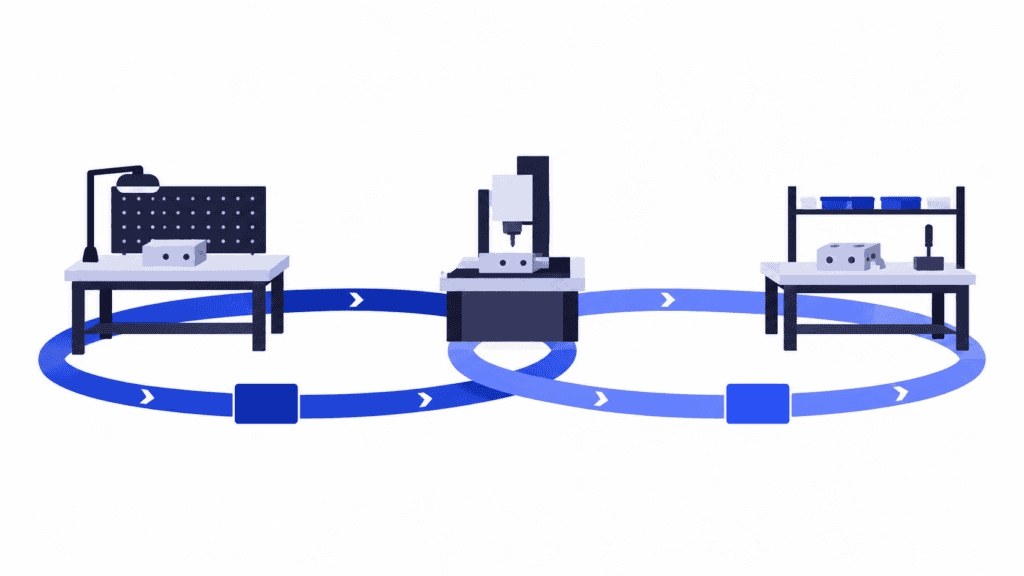
Imagine an order moving through fabrication cell A, machining cell B and assembly cell C. Its route uses an A/B loop and a B/C loop. Each loop has its own cards; an A/B card cannot be substituted for a B/C card.
Start in A with an A/B card
When the job is authorized at A, the team checks for an available A/B card and the material needed to do the work. If the conditions are satisfied, the card is attached to the job and processing begins.
The A/B card stays with the job when A finishes and transfers it to B. It does not return to A just because fabrication is complete. The card remains committed while the work waits at B and while B processes it.
Add the B/C card before work starts in B
Before B starts the machining work, the job must be authorized there and a B/C card must be available. During processing in B, the job therefore carries both its incoming A/B card and its outgoing B/C card. This is the overlap: B belongs to both loops.
If no B/C card is available, starting the machining work would feed a route whose permitted work is already committed. B should instead consider another ready, authorized job with the required card available. If none qualifies, the supervisor can redirect effort toward clearing the constraint or another useful task rather than launching work simply to keep B busy.
Return each card after its second cell finishes
Once B completes the job and it moves onward to C, the A/B card returns to A. A can use it for another qualifying job headed to B.
The B/C card continues with the order through C. After C completes its work, that card returns to B. If C is the final cell within the controlled flow, it does not need another outgoing-loop card to start.
This return rule is what makes the signal useful. Returning A/B early would allow more work into the loop before its existing job had finished in B. Keeping a completed job’s card unnecessarily would withhold permission that could be used again.
A card is still not a reservation for an immediately free machine. It regulates the work committed to a loop; it does not specify the exact processing time of every operation inside the cells.
POLCA, Kanban and CONWIP control different things
These methods all use authorization signals, but they answer different questions.
| Method | What the signal normally authorizes | Where it fits |
|---|---|---|
| Part-specific production kanban | Replenishment of a defined part and quantity after consumption | Repeatable parts with a workable replenishment loop |
| CONWIP | Another job entering a defined flow when a total-WIP authorization returns | Controlling the amount of work inside a chosen boundary |
| POLCA | Work entering a particular cell-pair loop, subject to job authorization | Different products taking different routes between cells |
Kanban in manufacturing is useful when the replenished item and its supply response are repeatable. A custom part that has not been designed or ordered yet cannot be managed as if it were a standard stocked component.
CONWIP can accommodate different products without a separate replenishment card for every part. Its distinguishing control is the WIP limit across the chosen flow. POLCA adds local signals for the cell-pair connections used by a job’s route, rather than relying on one total-flow limit alone.
The practical choice is not which acronym sounds more advanced. Ask what you need to regulate: replenishment of known items, total work in a defined system, or work committed between cells on changing routes. Different areas of a factory may have different answers.
Is POLCA a good fit for your factory?
POLCA is worth evaluating when product variety makes part-specific replenishment cumbersome, but the routes still pass through identifiable cells. You need to know which cell comes next for each job and be able to maintain the corresponding loops.
It is particularly relevant when local decisions repeatedly create downstream piles: an upstream team launches work to protect its utilization, while the receiving cell is already struggling. The method gives that team a reason to choose a different authorized job instead of adding to the pile.
There are also reasons to do preparatory work first. Unreliable routes make it hard to choose the right card. Missing material can tie up work and cards without producing progress. A cell that persistently lacks enough capacity for the accepted demand needs a capacity decision, not just a different number of cards.
The number and meaning of the loops matter as much as product variety. A very large set of rarely used cell-pair connections can become difficult to administer. Start with a coherent production family whose routes and handoffs you can explain, rather than putting a card between every imaginable pair of departments.
Above all, management must support the behavior it asks for. If operators are rewarded only for keeping their own machines busy, they have a strong incentive to bypass a rule that sometimes tells them not to start. Judge the pilot by order flow and delivery performance, not utilization alone.
Set up a pilot that tests the flow, not just the cards
Choose a manageable family of real orders and map the cells they actually visit. Include the people who schedule, process and move the work. Together, they need to settle four practical questions before launch.
What work does one card represent? A job, transfer batch or defined workload unit must have an agreed meaning. One short operation and one long operation do not become equal capacity demands because both carry a single job number. If the mix varies widely, review the workload represented by the cards rather than assuming an order count tells the whole story.
How much work should each loop permit? Set the initial card count using the expected flow, the time work spends through both cells and the chosen workload unit. Too many cards weaken congestion control; too few can starve work that could otherwise progress. There is no single card count that fits every loop or factory.
Who checks, moves and returns the cards? Make the authorization check and return points unambiguous. Train with a complete job journey, including a missing outgoing card, missing material and a blocked job. A controlled exception needs an owner and a recorded reason; routinely starting without the required permission defeats the control.
How will you know it is working? Establish a baseline for WIP, time through the controlled flow, throughput and delivery performance. During the pilot, check where cards and jobs are waiting. Review whether the cause is actual workload, a missed return, unreliable data or a recurring production problem before changing the limits.
That makes the pilot a useful learning process. You are testing whether work moves more predictably through the selected cells, not proving that the team can fill a board with colored cards.
A free loop does not settle the delivery plan
Return to the A–B–C route. Imagine another order goes from A to welding cell D. The first order has an available A/B card; the second has an available A/D card. Both are authorized and ready.
Later, both orders require the same finishing resource, which also serves other production families. Their local permissions do not tell the planner which order can finish first, whether the finishing queue fits before dispatch or what happens if an urgent customer order joins it.
This is where production scheduling needs the whole route. Cell-pair signals help control what may start. The connected schedule shows how operations compete for actual time on shared resources, and what that means for completion.
Trying to make each cell’s card list answer both questions creates extra manual work. The planner ends up comparing lists, moving jobs between resource queues and checking the same downstream conflicts again whenever a priority changes.
Use SkyPlanner to schedule the work across the factory
SkyPlanner APS gives accepted production work a common resource schedule. Define the process steps, eligible workstations, durations, shifts and dependencies; Arcturus, SkyPlanner’s scheduling AI, calculates where the operations fit within the configured capacity and priorities. The Gantt view makes the sequence and completion timing visible.
For the two orders sharing finishing capacity, that means seeing the downstream competition in the same plan as fabrication, machining and welding. You spend less time manually reconciling separate queues and have a clearer basis for deciding which commitment needs attention.
Agreed earliest starts can be represented with start eligibility dates, with the eligibility-date rule enabled. That date is a scheduling boundary, not confirmation that a POLCA card is free. Keep the actual loop-permission decision in the production control process and align the work you schedule with the permissions and start restrictions you have agreed.
You remain in charge of priorities. SkyPlanner’s Dynamic Priorities let you steer the calculation toward due dates, customer and job importance, and other scheduling objectives. A newly available card is not automatically the factory’s highest priority. With material-aware scheduling enabled, material availability is also considered when the consuming operation is scheduled.
When recorded capacity or priorities change, Arcturus can recalculate the connected schedule. Rather than rewriting every affected queue by hand, you can review the impact on the orders that matter. SkyPlanner integrates with any ERP or MES through its open REST API, so better scheduling can work alongside your existing order and production systems.
The manual-planning problem is familiar at Mamec, a mixing-technology and high-tech contract manufacturer. Its customer account describes thousands of interdependent work orders once prioritized from due dates on paper orders, without a reliable overall view. After integrating SkyPlanner with Oscar ERP, Mamec uses AI-powered finite scheduling and a shared production view, and reports a clearly lighter planning workload. Its experience illustrates the value of connected scheduling, rather than a POLCA implementation. Read Mamec’s SkyPlanner review for the full story.
Test the cell signals and shared capacity together
If POLCA fits your production, use the pilot to establish clear loop permissions and a dependable return process. Use SkyPlanner to make the accepted work’s resource sequence and delivery consequences visible across the factory. Together, those decisions address the real problem: starting the right work without losing sight of what it will take to finish it.
Book a SkyPlanner demo with a representative cell family, two orders with different routes and one resource they share. Bring the agreed start restrictions and priorities. That gives you a practical way to examine how SkyPlanner can reduce manual scheduling work and clarify the impact on deliveries.
If you prefer to explore first, try SkyPlanner with demo data or the AI-assisted Getting Started flow in SkyPlanner Assistant.
Jussi Mäntylä
Production Planning Specialist, SkyPlanner


